Ask Anything: How Busy Family Turns Your Words into the Right Events
A deep dive into hybrid vector search, structural filters, and LLM-guided relevance.
This post explains how we turn a user’s natural-language question into a ranked set of calendar events. We cover semantic search over an OpenSearch index, how user turns become both query vectors and structural filters, how we combine cosine-similarity scoring with the LLM as final arbiter, how we answer questions about event attendance, and how the calendar-events index mapping supports rich and compound queries. We close with the customer value this technical implementation delivers.
1. Why Keyword Search Fails Families
Traditional calendar search built on keyword or fuzzy matching is brittle. A LIKE "%soccer%" or even a fuzzy text match fails when:
- The user says "what do the kids have after school this week?" and the event is titled "Ethan — AYSO"
- The user asks for "team dinners" and the event says "Pizza with the squad"
- The user looks for "doctor appointments" and the title is "Annual physical"
Keyword search encodes characters, not meaning. Synonyms, abbreviations, and paraphrased intent don’t match. Semantic search closes that gap by embedding both the user’s question and each event into the same vector space, so we can rank by similarity of meaning instead of string overlap. We combine that with structural filters (date range, family, attendee status) and let the LLM choose the best candidates from the short list we return.
2. How Events Are Embedded at Index Time
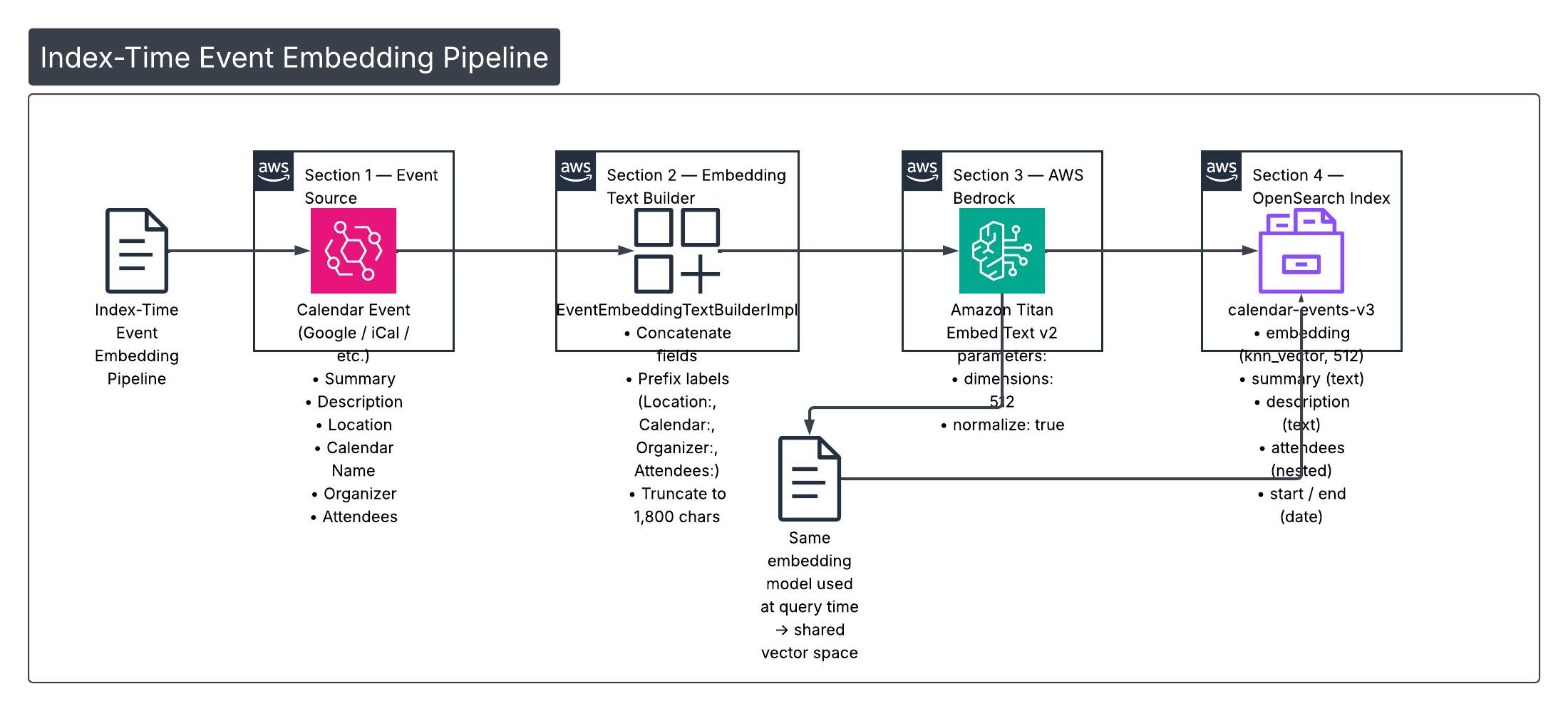
Before we can search by meaning, every calendar event must be turned into a fixed-size vector. We do that in two steps: build a rich text representation of the event, then send that text to an embedding model.
Building the embedding text
The family service uses EventEmbeddingTextBuilderImpl to assemble a single string from the event’s most search-relevant fields:
- Event summary (title)
- Cleaned description
- Location (prefixed as
Location: …) - Calendar display name (
Calendar: …) - Organizer (
Organizer: …) - Attendees (
Attendees: …)
Parts are joined with . and truncated to a configurable maximum (default 1,800 characters) so we stay within the embedding model’s token limits. Example:
override fun buildEmbeddingText(
    summary: String,
    cleanedDescription: String,
    location: String?,
    calendarDisplayName: String,
    organizer: String?,
    attendeeSummaries: List<String>
): String {
    val parts = mutableListOf<String>()
    if (summary.isNotBlank()) parts += summary.trim()
    if (cleanedDescription.isNotBlank()) parts += cleanedDescription.trim()
    location?.takeIf { it.isNotBlank() }?.let { parts += "Location: ${it.trim()}" }
    if (calendarDisplayName.isNotBlank()) parts += "Calendar: ${calendarDisplayName.trim()}"
    organizer?.takeIf { it.isNotBlank() }?.let { parts += "Organizer: ${it.trim()}" }
    if (attendeeSummaries.isNotEmpty()) parts += "Attendees: ${attendeeSummaries.joinToString(", ")}"
    val text = parts.joinToString(". ")
    return if (text.length <= maxChars) text else text.substring(0, maxChars).trimEnd() + "…"
}
That string is the input to the embedding model. The same structure is used whether we’re indexing one event or embedding the user’s query at search time (for the query we pass the raw user turn or LLM-extracted phrase as a single text).
Calling Titan Embed Text v2
We use AWS Bedrock Titan Embed Text v2 (amazon.titan-embed-text-v2:0) for both indexing and query-time embedding. The familyAgent EmbeddingService sends the text to Bedrock with fixed parameters so that index and query vectors live in the same space:
dimensions: 512normalize: true (L2 normalization so we can use cosine similarity in OpenSearch)
Core invocation:
val requestBody = buildString {
    append("{")
    append("\"inputText\":\"${escapeJson(truncatedText)}\",")
    append("\"dimensions\":512,")
    append("\"normalize\":true")
    append("}")
}
val request = InvokeModelRequest.builder()
    .modelId(MODEL_ID)  // "amazon.titan-embed-text-v2:0"
    .body(SdkBytes.fromUtf8String(requestBody))
    .build()
val response = bedrockClient.invokeModel(request).await()
// ... parse "embedding" array from response → FloatArray(512)
The resulting 512-dimensional vector is stored in the embedding field of the calendar-events-v3 index (and used at query time as the kNN query vector). Using the same model and parameters for index and query keeps the space aligned.
3. How a User Turn Becomes a Query
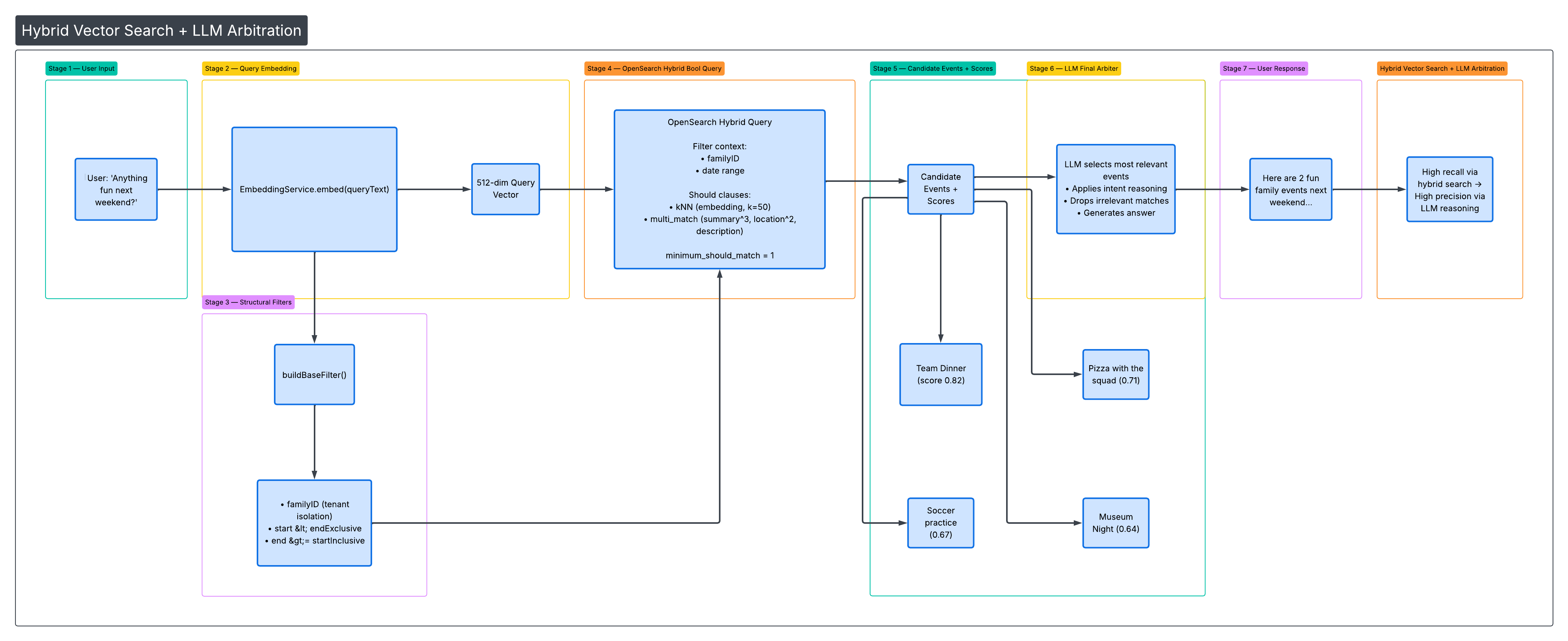
When the user asks something like "anything fun for the family next weekend?", the assistant’s tool layer turns that into an OpenSearch request in three steps: embed the query, build structural filters, and run a hybrid query.
Query vector
The same EmbeddingService.embed(text) used at index time is called with the user’s query (or the LLM’s extracted query argument from the tool). That yields a 512-dim vector in the same space as the event embeddings.
Structural filters
Before any semantic or text matching, we restrict to the right tenant and time window via buildBaseFilter():
- familyID — term query so results are scoped to that family’s calendars (multi-tenant isolation).
- Date range — two range clauses:
start < endExclusive(event starts before the window end)end >= startInclusive(event ends on or after the window start)
So we only consider events that overlap the requested interval. These clauses are always applied as filter context (they don’t affect scoring, only inclusion).
Hybrid bool query
We combine semantic and keyword search in a single bool query:
- kNN (semantic) —
shouldclause: find the k=50 nearest neighbours in theembeddingfield using the query vector. - multimatch (text) —
shouldclause: same query text run againstsummary^3,description,descriptionnormalized,location^2,calendarDisplayNamewith fuzzinessAUTO. - minimumShouldMatch("1") — at least one of the two (semantic or text) must match so we get results from either signal.
Filter context is the list from buildBaseFilter() (familyID + date range). So the full shape is: filter by family and date, then score by semantic and/or text match. Snippet from OpenSearchCalendarEventSearchService.searchEventsHybrid():
val embedding = embeddingService.embed(queryText)
val baseFilter = buildBaseFilter(familyID, startInclusive, endExclusive)

val knnQuery = Query.of { q ->
    q.knn { k ->
        k.field("embedding")
        k.vector(embedding)
        k.k(KNN_K)  // 50
    }
}
val textQuery = Query.of { q ->
    q.multiMatch { m ->
        m.query(queryText)
        m.fields(listOf("summary^3", "description", "description_normalized", "location^2", "calendarDisplayName"))
        m.fuzziness("AUTO")
    }
}
val query = Query.of { q ->
    q.bool { b ->
        b.filter(baseFilter)
        b.should(knnQuery)
        b.should(textQuery)
        b.minimumShouldMatch("1")
    }
}
Results are sorted by start so the LLM sees events in chronological order; each hit’s score (from the hybrid query) is attached to the document and surfaced in the tool response.
4. Cosine Similarity and the LLM as Final Arbiter
We use a minimum semantic score as a first gate and then let the LLM decide which of the returned candidates actually answer the user’s question.
Score threshold
OpenSearchCalendarEventSearchService defines MINSEMANTICSCORE = 0.65. Results with cosine similarity below this are treated as low relevance. The hybrid query returns a mix of kNN and text-match scores; surfacing the score to the LLM helps it weigh candidates (e.g. high semantic score + matching date range = strong candidate).
Surfacing scores to the LLM
Each returned event is mapped to a CalendarEventDocument that carries an optional score. The calendar search tool formats the tool result so the model sees that score next to each candidate, for example:
- Team dinner (ID: abc123) (score: 0.82) — 2026-03-01T18:00 to 2026-03-01T20:00 @ Home
- Pizza with the squad (ID: def456) (score: 0.71) — …
So the LLM gets both the event metadata and the retrieval score when choosing what to present to the user.
Why the LLM is the final arbiter
The tool description explicitly tells the model: "You (LLM) are the final arbiter—choose the most relevant returned candidates that answer the user's question." We do this because:
- OpenSearch efficiently narrows the set to a small number of plausible candidates (e.g. up to 50) using vectors and filters.
- The index cannot fully capture intent like "something fun for the family" or "not work-related." The LLM applies world knowledge and the full conversation context to pick and phrase the best answers.
So the pipeline is: retrieve with hybrid search + filters → attach scores → let the LLM select and summarize. That keeps recall high (we don’t over-filter in the index) while keeping answers precise (the LLM drops irrelevant candidates).
5. How We Handle Questions About Event Attendance
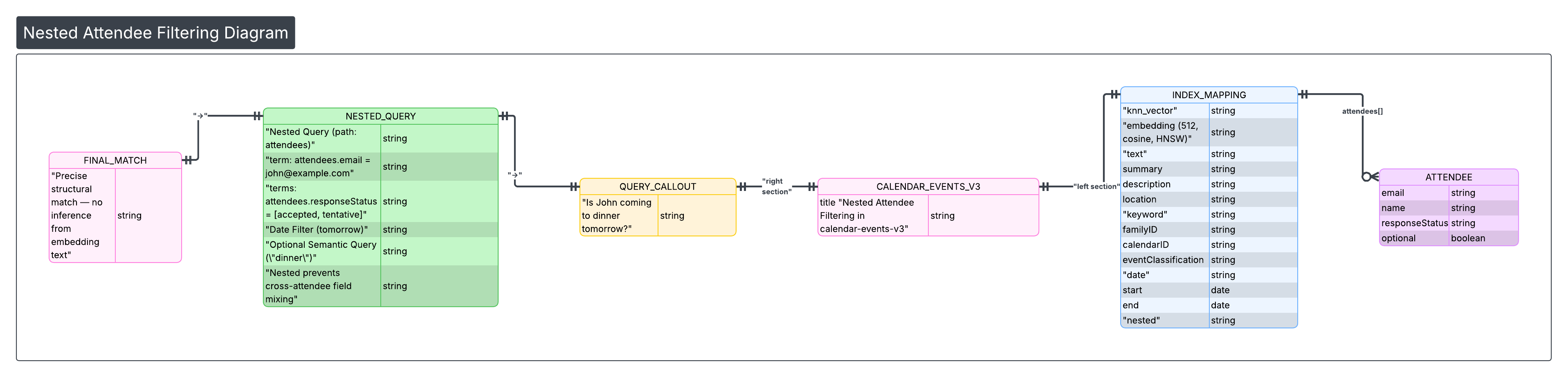
Attendance is a structural fact: an attendee is either on the event with a given response status or not. We do not rely on the embedding text (which may mention attendee names) to infer attendance; we use a dedicated nested filter in OpenSearch.
Nested attendee model
The calendar-events-v3 index models attendees as a nested type. Each attendee is an object with fields such as email, name, responseStatus, optional, self, organizer, resource. Nested indexing keeps each attendee as a separate sub-document so we can query “events where this person has this status” without cross-attendee field mixing.
buildAttendeeNestedFilter
We build a single filter that:
- Matches the given person by email (term) or name (match).
- Optionally restricts to certain responseStatus values (
accepted,tentative,declined).
This is wrapped in a nested query on the attendees path so that both the person match and the status match apply to the same attendee object. Conceptually:
// nameOrEmailQuery: term on attendees.email OR match on attendees.name
// statusQuery (optional): terms on attendees.responseStatus
q.nested { n ->
    n.path("attendees")
    n.query(
        bool { nb -> nb.must(nameOrEmailQuery, statusQuery?) }
    )
}
Attendee-specific tool
The searcheventsby_attendee tool is designed for questions like:
- "Is John coming to dinner tomorrow?" → attendee = John, responseStatuses = [accepted, tentative], queryText = "dinner"
- "Show events where Alex is tentative" → attendee = Alex, responseStatuses = [tentative]
- "Events where John declined" → attendee = John, responseStatuses = [declined]
- "Events I'm invited to with Sarah" → attendee = Sarah, optional queryText
The tool description states that we use the v3 nested attendee query for precise matching and that the model should not infer attendance from embeddings alone. When a semantic or keyword query is also provided (queryText), we combine the attendee filter with the same hybrid (kNN + multi_match) logic so we can answer who and what together (e.g. "dinner events where Sarah is tentative").
6. The Calendar Events Mapping and Rich Queries
The calendar-events-v3 index mapping is what makes the above behaviour possible. Here we summarize the field roles and then give examples of the kinds of rich and compound queries they support.
Field categories
- knn_vector —
embedding, 512 dimensions, HNSW, cosine similarity. Used for semantic kNN search. - text —
summary,description,descriptionnormalized,location. Used for full-text and hybrid multimatch (with boosts, e.g. summary^3, location^2). - keyword —
familyID,calendarID,calendarDisplayName,eventClassification,eventType,organizer,status,visibility,location_keyword, etc. Used for exact filters and faceting. - date —
start,end. Used for time-window filters (e.g. “this week”, “next month”). - geo_point —
coordinates. Used for location-based proximity (e.g. “events near me”). - boolean —
isPrimaryCalendar,isAvailable. Used for availability and calendar-type filters. - nested —
attendees(email, name, responseStatus, etc.). Used for attendee and response-status filters.
Together, these support both semantic/text search and precise structural constraints.
Example query types the mapping enables
| User intent | How we use the mapping |
|---|---|
| "Fun things coming up" | kNN on query embedding + date filter; no keyword needed. |
| "All events at Dodger Stadium" | multimatch on location (and optionally locationkeyword) + date filter. |
| "What's on my kids' calendars this month?" | Filter by calendarDisplayName (or calendar IDs) + date range. |
| "Work events where I'm free" | Filter by eventClassification + isAvailable == true + date range. |
| "Soccer practice that Alex accepted" | kNN (e.g. "soccer practice") + nested attendee filter (Alex, accepted) + date range. |
| "Family dinners in the next two weeks with Sarah tentative" | Hybrid kNN/text for "family dinners" + date range + nested attendee (Sarah, tentative). |
So the mapping is built to support pure semantic search, pure keyword/structural search, and any combination (hybrid + filters + attendee) in one request.
7. Customer Value
Families don’t speak in database queries. They ask "what do we have after school?", "is John coming to dinner?", and "anything fun next weekend?" Semantic search over calendar events lets the assistant understand intent and match events by meaning, not just keywords. Combining that with strict filters (family, date, attendee status) and an LLM that chooses the best candidates from a small set gives high recall and precise answers. Rich attendee modelling means the assistant can reason about who is attending and with what status, not only what is on the calendar. The same indexing and search pipeline scales across all connected calendars in a household without per-family tuning, so we can deliver this experience consistently as more calendars and events are added.