Building an AI Agent with AWS Bedrock Streaming APIs and Tool Calling
Introduction
At Busy Family, we've built an AI-powered personal assistant that helps families coordinate schedules, plan events, plan meals, and find free time together. The system leverages AWS Bedrock's conversation streaming APIs combined with a sophisticated tool-calling architecture to provide real-time, interactive assistance. In this post, we'll dive into the technical implementation, exploring how we handle streaming conversations, tool registration, and the complex orchestration required to make an AI agent that can actually take actions on behalf of users.
Architecture Overview
Our AI agent is built on AWS Bedrock's ConverseStream API, which provides a reactive streaming interface for conversational AI. The system is implemented in Kotlin using coroutines for asynchronous processing, allowing us to handle multiple concurrent conversations while maintaining responsive streaming to clients.
The core components include:
- ChatRequestHandler: Orchestrates conversation flow, handles streaming responses, and manages tool execution
- Tool System: A pluggable architecture for registering and executing tools
- Reflection Service: Validates tool invocations against user intent using LLM-powered validation
- Rich Elements: Structured data types for UI rendering beyond plain text
Streaming Conversation Flow
Setting Up the Stream
When a user sends a message, we build a ConverseStreamRequest that includes:
- Conversation History: Previous messages in the conversation
- System Prompt: Context about the agent's role and capabilities, plus user memory
- Tool Configuration: All available tools with their schemas
- Inference Configuration: Model parameters (temperature, top-p, max tokens)
The system prompt is enhanced with user memory context loaded from persistent storage (S3). This memory includes:
- User Knowledge: Facts about the user and their family
- User Preferences: Preferences and settings
- Conversation Summary: Summary of previous conversations
// Load memory context from persistent storage
val memoryContext = if (!isFollowup && history.isEmpty()) {
    val loadResult = conversationStateManager.loadOrStartConversation(familyID)
    loadResult.memoryContext
} else {
    // For follow-ups, retrieve from memory service
    val memory = memoryService.loadMemory(familyID)
    memory?.let { memoryService.buildMemoryContext(it) }
}

// Build system prompt with memory context prepended
val familySpecificPrompt = if (memoryContext != null) {
    """
    $memoryContext

    ${systemPrompt}

    The current family ID is: $familyID
    """.trimIndent()
} else {
    """
    ${systemPrompt}

    The current family ID is: $familyID
    """.trimIndent()
}

val requestBuilder = ConverseStreamRequest.builder()
    .modelId(modelId)
    .messages(messages)
    .inferenceConfig(inferenceConfig)
    .toolConfig(toolConfiguration.toBedrockToolConfiguration())
    .system(SystemContentBlock.fromText(familySpecificPrompt))
This memory context allows the agent to maintain continuity across sessions, remembering user preferences, family members, and previous conversation context without requiring users to repeat information.
Processing Stream Events
The streaming API uses a reactive streams pattern with a Subscriber interface. We handle three types of events:
- ContentBlockDelta: Text chunks as they're generated
- ToolUseBlockStart/ToolUseBlockDelta: Tool invocations with streaming arguments
- MessageStop: End of the assistant's turn
val handler = ConverseStreamResponseHandler.builder()
    .onEventStream { publisher ->
        publisher.subscribe(object : Subscriber<ConverseStreamOutput> {
            override fun onNext(ev: ConverseStreamOutput) {
                when {
                    raw.contains("ContentBlockDelta") -> {
                        // Accumulate text chunks
                        accumulatedContent += extractedText
                        // Stream to client immediately
                        thinker.thinking(Thought(content = accumulatedContent, final = false))
                    }
                    raw.contains("ToolUseBlockStart") -> {
                        // Start tracking a new tool call
                        pendingToolCalls.add(PendingToolCall(toolUseId, toolName))
                    }
                    raw.contains("ToolUseBlockDelta") -> {
                        // Accumulate tool arguments
                        pendingToolCalls.last().inputBuilder.append(frag)
                    }
                    raw.contains("MessageStop") -> {
                        // Execute tools or finalize text response
                        if (pendingToolCalls.isNotEmpty()) {
                            handleToolUse(pendingToolCalls, familyID, thinker, turnDepth)
                        }
                    }
                }
            }
        })
    }
    .build()
Handling Text vs. Tools
One interesting challenge is that Bedrock can stream both text and tool calls in the same response. We prioritize tool calls when both are present, as tools represent actionable intent:
if (pendingToolCalls.isNotEmpty()) {
    // Execute tools - these take precedence
    handleToolUse(pendingToolCalls, familyID, thinker, turnDepth)
} else if (anyTextStreamed && accumulatedContent.isNotBlank()) {
    // Finalize text response
    conversationHistoryStore.addMessage(familyID, aiResponse)
}
Tool System Architecture
Tool Interface
Every tool implements a simple interface:
interface Tool {
    val name: String
    val description: String
    val inputSchema: JsonObject

    suspend fun execute(
        arguments: JsonObject,
        chatRequestHandler: ChatRequestHandler,
        familyID: String,
        preferRichElements: Boolean = false
    ): ToolResult
}
The description and inputSchema are critical - they're sent to the LLM as part of the tool specification, so the model can understand when and how to use each tool.
Tool Registration
Tools are registered using Koin dependency injection. Each tool is a singleton with its dependencies injected:
single<Tool>(GetCalendarEventsToolQualifier) {
    val familyCalendarSource = get<FamilyCalendarSource>()
    val gson = get<Gson>(CustomGSON)
    GetCalendarEventsTool(familyCalendarSource, gson)
}
The ToolFactory aggregates all registered tools into a map for quick lookup:
single<ToolFactory> {
    val allTools = getAll<Tool>()
    val toolsMap = allTools.associateBy { it.name }
    ToolFactoryImpl(toolsMap)
}
Converting to Bedrock Format
The ToolConfiguration class converts our internal tool representation to Bedrock's ToolConfiguration format:
fun toBedrockToolConfiguration(): ToolConfiguration {
    val bedrockTools = tools.map { tool ->
        Tool.builder()
            .toolSpec(
                ToolSpecification.builder()
                    .name(tool.name)
                    .description(tool.description)
                    .inputSchema(
                        ToolInputSchema.builder()
                            .json(convertToDocument(tool.inputSchema))
                            .build()
                    )
                    .build()
            )
            .build()
    }
    return ToolConfiguration.builder().tools(bedrockTools).build()
}
The conversion handles the complexity of translating Gson JsonObject schemas to AWS SDK Document types, supporting nested objects, arrays, and primitives.
Tool Execution Flow
Parsing Tool Calls from Stream
Tool calls arrive incrementally in the stream. We track each tool call with a PendingToolCall:
data class PendingToolCall(
    val toolUseId: String,
    val toolName: String,
    val inputBuilder: StringBuilder = StringBuilder()
)
As ToolUseBlockDelta events arrive, we accumulate the JSON arguments:
raw.contains("ToolUseBlockDelta(Input=") -> {
    val frag = extractInputFragment(raw)
    pendingToolCalls.last().inputBuilder.append(frag)
}
Executing Tools
When MessageStop is received, we execute all pending tools:
- Persist Tool Use: Store the assistant's tool invocation in conversation history
- Execute Tools: Call each tool's
execute()method - Build Tool Results: Convert tool results to Bedrock's
ToolResultBlockformat - Continue Conversation: Add tool results as a user message and re-invoke the conversation
private suspend fun handleToolUse(
    pendingToolCalls: List<PendingToolCall>,
    familyID: String,
    thinker: Thinker,
    turnDepth: Int
) {
    // 1. Store assistant's tool use message
    val assistantToolUseMsg = Message.builder()
        .role(ConversationRole.ASSISTANT)
        .content(toolUseContentBlocks)
        .build()
    conversationHistoryStore.addMessage(familyID, assistantToolUseMsg)

    // 2. Execute tools
    val toolResultBlocks = mutableListOf<ContentBlock>()
    pendingToolCalls.forEach { call ->
        val tool = toolFactory.getTool(call.toolName)
        val args = parseJsonArguments(call.inputBuilder.toString())
        val result = tool?.execute(args, this, familyID, shouldPreferRichElements)

        // 3. Build tool result block
        val toolResultBlock = ToolResultBlock.builder()
            .toolUseId(call.toolUseId)
            .content(ToolResultContentBlock.fromText(result.message))
            .build()
        toolResultBlocks.add(ContentBlock.fromToolResult(toolResultBlock))
    }

    // 4. Store tool results and continue conversation
    val followUpMsg = Message.builder()
        .role(ConversationRole.USER)
        .content(toolResultBlocks)
        .build()
    conversationHistoryStore.addMessage(familyID, followUpMsg)

    // 5. Re-invoke conversation with tool results
    handleChatRequest("", familyID, thinker, isFollowup = true, turnDepth = turnDepth + 1)
}
Multi-Turn Conversations
The system supports multi-turn tool execution. After tools execute, we automatically continue the conversation by calling handleChatRequest with isFollowup = true. This allows the LLM to:
- Process tool results
- Make additional tool calls if needed
- Generate a final response incorporating tool results
We limit the turn depth to prevent infinite loops (currently 7 turns).
Rich Elements for UI
Structured Data Types
Beyond plain text, tools can return structured data for rich UI rendering:
sealed class RichElement {
    data class CalendarEvent(
        val id: String,
        val title: String,
        val time: String,
        val date: String,
        val dayOfWeek: String,
        val location: String?,
        val eventType: String
    ) : RichElement()

    data class ConnectionCard(...) : RichElement()
    data class AvailabilitySlot(...) : RichElement()
    data class WeatherCard(...) : RichElement()
    data class ShoppingListCard(
        val id: String,
        val title: String,
        val items: List<GroceryItem>,
        val storeLocation: String,
        val googleMapsUrl: String,
        val createdAt: Long
    ) : RichElement()
    data class RecipeCard(
        val id: String,
        val title: String,
        val ingredients: List<Ingredient>,
        val imageUrl: String?,
        val createdAt: Long
    ) : RichElement()
    // ... more types
}
Tool Result Types
Tools return ToolResult which can be:
- Success: Plain text message
- SuccessWithRichElements: Text + structured data
- Error: Error message
- ContinueConversation: Triggers additional conversation context
sealed class ToolResult {
    data class Success(val message: String) : ToolResult()
    data class SuccessWithRichElements(
        val message: String,
        val richElements: List<RichElement>
    ) : ToolResult()
    data class Error(val message: String) : ToolResult()
    data class ContinueConversation(val additionalContext: String) : ToolResult()
}
Rich Element Caching
Rich elements are cached with markers so they can be referenced in the final response:
if (!shouldPreemptWithRichElements) {
    val marker = when (call.toolName) {
        "get_calendar_events" -> "CALENDAR_EVENTS"
        "get_family_connections" -> "CONNECTIONS"
        // ...
    }
    richElementCache.store(familyID, marker, processedResult.richElements)
    familyMarkers[familyID] = marker
}
The final response includes a JSON reference to cached rich elements:
val jsonObject = JsonObject().apply {
    addProperty("message", cleanMessage)
    addProperty("richElement", richElementRef)
}
Reflection: Validating Tool Calls
The Problem
LLMs can sometimes misinterpret user intent or make errors in tool arguments. For critical operations like creating calendar events, we need validation.
The Solution
Our ReflectionService uses a second LLM call to validate tool invocations:
suspend fun validate(
    userMessage: String,
    toolCalls: List<Pair<String, JsonObject>>,
    currentDateTime: String,
    familyHomeAddress: String?
): ReflectionResult
The reflection prompt asks the LLM to check:
- Date/Time Accuracy: Are dates correct? Are relative times ("tomorrow") resolved properly?
- Location Accuracy: Are locations valid? Are addresses correct?
- Intent Matching: Do the tool calls match what the user asked for?
Rollback on Validation Failure
If validation fails, we:
- Rollback Operations: Delete any calendar events that were created
- Remove History: Remove the failed tool invocation from conversation history
- Retry with Corrections: Add a correction message and retry the conversation
if (!validationResult.valid) {
    // Delete events created before retry
    for (execution in toolExecutions) {
        if (execution.toolName == "create_calendar_event") {
            calendarEventService.deleteEvent(familyID, eventId)
        }
    }

    // Remove failed messages from history
    history.removeAt(history.size - 1) // tool results
    history.removeAt(history.size - 1) // tool use

    // Add correction and retry
    val correctionMsg = Message.builder()
        .role(ConversationRole.USER)
        .content(ContentBlock.fromText(correctionMessage))
        .build()
    conversationHistoryStore.addMessage(familyID, correctionMsg)
    handleChatRequest("", familyID, thinker, isFollowup = true, turnDepth)
}
Example Tool: Creating Calendar Events
Let's look at a concrete example - the CreateCalendarEventTool:
Tool Definition
class CreateCalendarEventTool(
    private val calendarEventService: CalendarEventService,
    private val resolutionService: CalendarEventResolutionService,
    private val llmParsingService: LLMParsingService,
    private val familySource: FamilySource
) : Tool {

    override val name: String = "create_calendar_event"

    override val description: String = """
        Create a new calendar event. This tool can parse natural language
        descriptions of events and create them in the user's Google Calendar.
        Features:
        - Natural language date/time parsing ("tomorrow at 2 PM")
        - Automatic name resolution (converts "Simon" to email)
        - Venue lookup (converts "Mountain Winery" to full address)
        - Recurring event support
        - Custom reminders
    """.trimIndent()

    override val inputSchema: JsonObject = JsonObject().apply {
        add("properties", JsonObject().apply {
            add("title", JsonObject().apply {
                addProperty("type", "string")
                addProperty("description", "Title of the calendar event")
            })
            add("startTime", JsonObject().apply {
                addProperty("type", "string")
                addProperty("description", "Start time in natural language")
            })
            // ... more properties
        })
    }
}
Tool Execution
override suspend fun execute(
    arguments: JsonObject,
    chatRequestHandler: ChatRequestHandler,
    familyID: String,
    preferRichElements: Boolean
): ToolResult {
    val title = arguments.get("title")?.asString ?: return ToolResult.Error("Title required")
    val startTimeStr = arguments.get("startTime")?.asString ?: return ToolResult.Error("Start time required")

    // Resolve attendees (names -> emails)
    val resolvedAttendees = resolutionService.resolveAttendees(familyID, attendees)

    // Resolve location (venue name -> address)
    val resolvedLocation = resolutionService.resolveLocation(location, familyID)

    // Parse natural language date/time using LLM
    val parsedStartTime = llmParsingService.parseDateTime(startTimeStr, timezone)
    val startTime = ZonedDateTime.parse(parsedStartTime)

    // Create event
    val result = calendarEventService.createEvent(familyID, request)

    when (result) {
        is CalendarEventResult.Success -> {
            ToolResult.SuccessWithRichElements(
                message = "✅ Created calendar event '${result.eventTitle}'",
                richElements = listOf(
                    RichElement.CalendarEvent(
                        id = result.eventId,
                        title = result.eventTitle,
                        time = formatTime(result.startTime),
                        date = formatDate(result.startTime),
                        // ...
                    )
                )
            )
        }
        is CalendarEventResult.Error -> {
            ToolResult.Error(result.message)
        }
    }
}
Available Tools
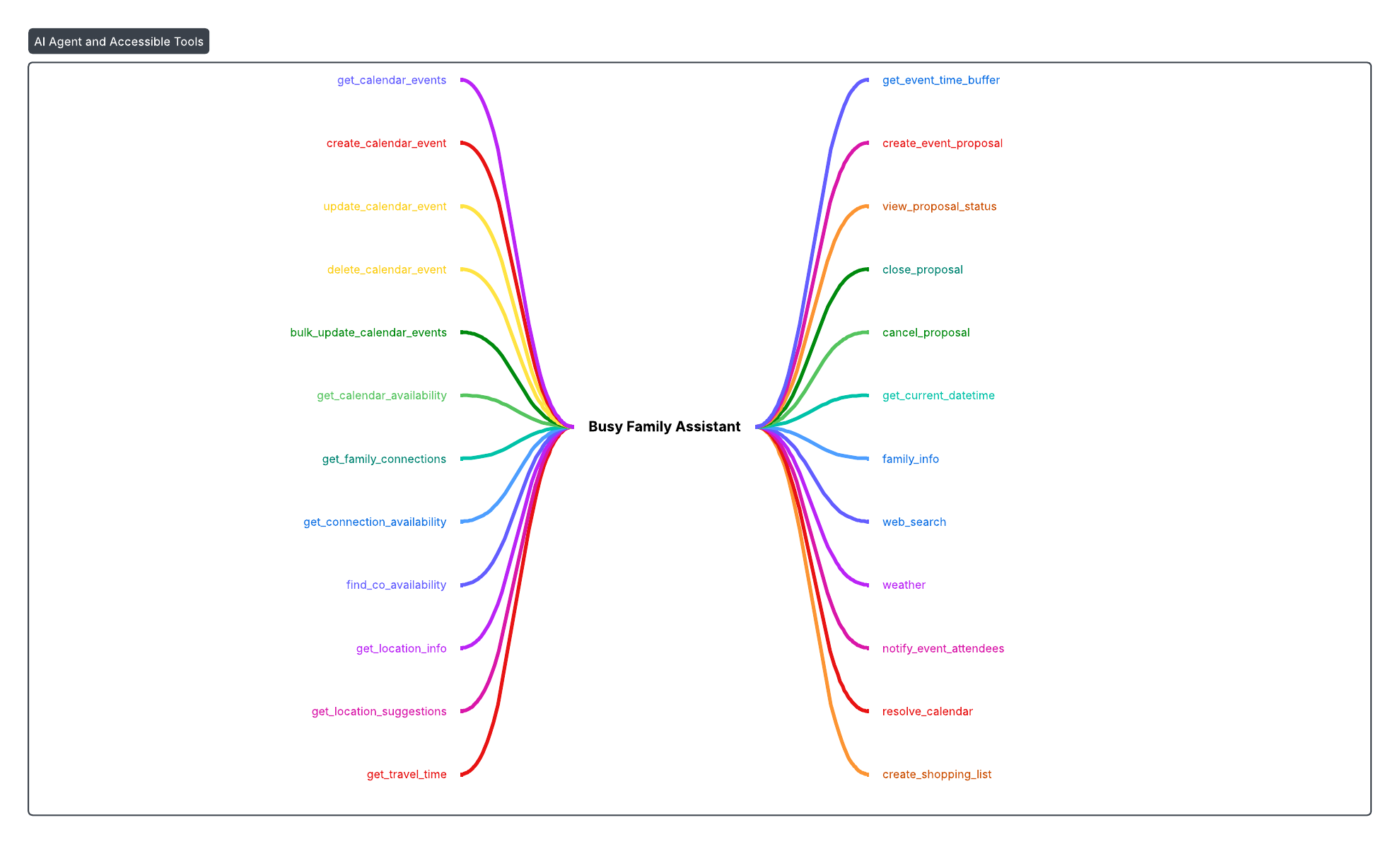
Our system includes 24+ tools covering:
Calendar Operations:
get_calendar_events: Retrieve events with filteringcreate_calendar_event: Create events with natural language parsingupdate_calendar_event: Update existing eventsdelete_calendar_event: Delete eventsbulk_update_calendar_events: Batch operationsget_calendar_availability: Find free time slots
Connection & Availability:
get_family_connections: List family contactsget_connection_availability: Check when contacts are availablefind_co_availability: Find mutual free time
Location & Travel:
get_location_info: Get distance/travel timeget_location_suggestions: Find meeting venuesget_travel_time: Calculate travel timesget_event_time_buffer: Account for travel time
Event Proposals:
create_event_proposal: Create multi-option event proposalsview_proposal_status: Check proposal responsesclose_proposal: Finalize a proposalcancel_proposal: Cancel a proposal
Grocery & Recipe Management:
create_shopping_list: Create grocery shopping lists from meal planning conversations (integrates with Instacart)get_shopping_list: Retrieve shopping lists (current active or by ID) with rich UI cardscreate_recipe_card: Create recipe card pages with ingredients and instructions (integrates with Instacart)get_recipe_card: Retrieve recipe cards by ID or filtered by title, supporting ingredient queries
Utilities:
get_current_datetime: Get authoritative current timefamily_info: Get family contextweb_search: Search the webweather: Get weather forecastsnotify_event_attendees: Send notificationsresolve_calendar: Resolve calendar names to IDs
Key Design Decisions
1. Streaming vs. Non-Streaming
We use streaming for all conversations to provide immediate feedback. Text streams character-by-character, and tool calls are executed as soon as they're complete.
2. Tool Result Format
Tool results are sent back to the LLM as text in ToolResultBlock. This allows the LLM to reason about results and generate natural language responses. Rich elements are cached separately and referenced in the final response.
3. Multi-Turn Execution
After tools execute, we automatically continue the conversation. This enables workflows like:
- User: "Find free time with Simon"
- Agent: Calls
find_co_availability - Agent: Calls
create_calendar_eventwith the found time - Agent: Calls
notify_event_attendees - Agent: "I found time and created the event!"
4. Reflection Validation
Critical operations (create/update/delete events) are validated using reflection. This catches common errors like:
- Misinterpreting "tomorrow" when it's past midnight
- Using wrong timezone
- Incorrect location addresses
5. Rich Elements
Rich elements provide structured data for UI rendering while keeping the LLM conversation natural. The LLM receives text results, but the frontend gets structured data for rich cards, calendars, etc.
Challenges & Solutions
Challenge: Streaming Tool Arguments
Tool arguments arrive incrementally as JSON fragments. We accumulate them in a StringBuilder and parse when complete.
Solution: Robust JSON parsing with error handling for malformed fragments.
Challenge: Tool Call vs. Text Priority
Bedrock can stream both text and tool calls. We prioritize tool calls when both are present.
Solution: Track anyTextStreamed flag and clear pending tool calls if text starts streaming.
Challenge: Multi-Turn Loop Prevention
Unlimited tool execution could create infinite loops.
Solution: Turn depth limit (7 turns) with graceful degradation.
Challenge: Reflection Rollback
If reflection fails, we need to undo operations.
Solution: Track tool executions before reflection, rollback on failure, store update arguments for potential recreation.
Performance Considerations
- Async Execution: All tool execution happens in coroutines, allowing concurrent processing
- Streaming: Text streams immediately, providing low-latency feedback
- Caching: Rich elements are cached to avoid re-computation
- History Management: Conversation history is stored efficiently, loaded on-demand
Conclusion
Building an AI agent with tool calling requires careful orchestration of streaming APIs, tool execution, and conversation management. AWS Bedrock's streaming APIs provide a solid foundation, but the real challenge is in:
- Robust Tool Architecture: Clean interfaces, dependency injection, and schema validation
- Stream Processing: Handling incremental data, managing state, and coordinating execution
- Error Handling: Validation, rollback, and graceful degradation
- User Experience: Streaming responses, rich UI elements, and natural conversation flow
The system we've built handles all of these concerns while maintaining a clean, extensible architecture. New tools can be added by simply implementing the Tool interface and registering them in the dependency injection module.
For developers building similar systems, we recommend:
- Start with a simple tool interface
- Use dependency injection for tool registration
- Handle streaming incrementally with proper state management
- Implement validation for critical operations
- Design for multi-turn conversations from the start
The combination of AWS Bedrock's streaming APIs and a well-designed tool system creates a powerful platform for building AI agents that can actually take actions, not just answer questions.