Memory Architecture in the Busy Family Agent
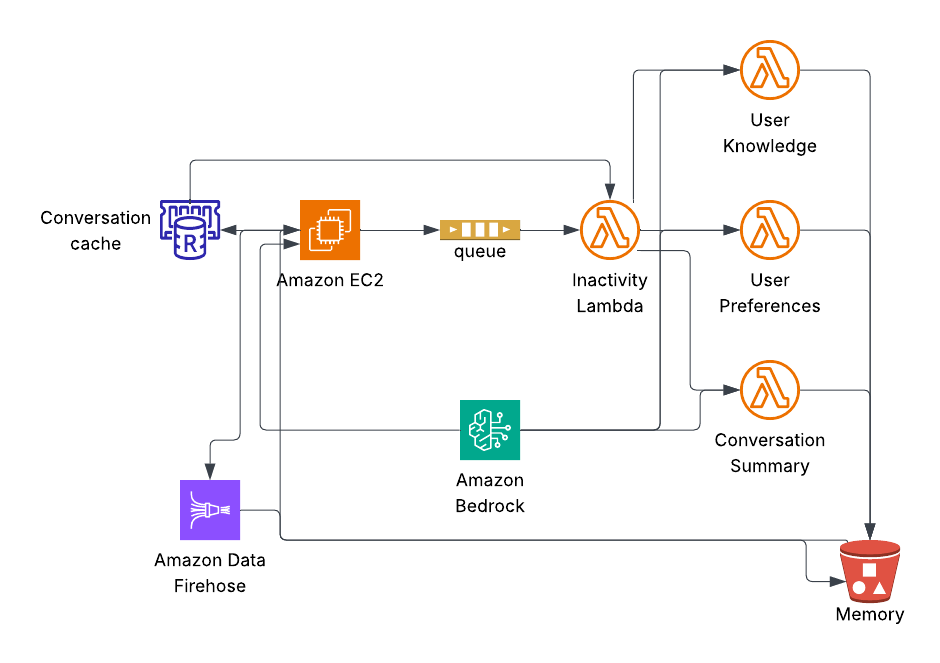
This post describes the technical implementation of cross-session memory in the Busy Family conversational agent: how memory is stored, loaded, injected into context, and how conversation turns are captured for a separate memory-formation pipeline. The conversation service is designed as a consumer of memory only—it does not form or update memories itself.
1. Introduction
A conversational assistant that forgets everything between sessions feels generic. Users expect the system to remember who is in the household, how they prefer to be notified, and what was discussed last time. Cross-session memory solves that.
The Busy Family agent achieves this with a clear split of responsibilities: the conversation service runs the chat, loads existing memory from storage, and journals every turn to a stream. A separate memory-formation pipeline consumes that stream and writes updated memory back to storage. The agent never writes knowledge or preferences itself—it only reads them and uses them. That decoupling keeps the chat path simple and lets the memory pipeline evolve (e.g., better summarization, new strategies) without touching the agent.
The rest of this post covers: where memory lives at rest, how it is shaped for the model, when and how it is loaded, how it is injected into the prompt, how turns are streamed out via Kinesis Firehose, how a delayed SQS message signals session completion for the memory pipeline, how users can view, edit, or clear their memories, and (in sections 9–12) how the memory-formation pipeline itself works—inactivity checks via SQS and ValKey, session-partitioned turn storage in S3, the orchestrator and specialized summarization Lambdas, and the extensibility benefits of this design.
2. Memory at Rest: Three Files per Family in S3
Persistent memory for a family is stored in S3 under a fixed key layout: {familyID}/memory/{filename}. The main memory is split across three files:
user_knowledge.json— factual information about the user and householduser_preferences.json— preferences, habits, and communication styleconversation_summary.json— summary of the last conversation
Splitting into three files lets the memory-formation pipeline update one category (e.g., preferences) without reading or writing the others. Each file uses a JSON envelope; the important part for the model is the content field, which holds plain-text markdown. Metadata fields provide provenance. The schemas are defined in MemoryFileModels.kt:
data class UserKnowledge(
    val familyID: String,
    val content: String,       // Plain text narrative of factual information
    val updatedAt: Instant,
    val sessionCount: Int
)

data class UserPreferences(
    val familyID: String,
    val content: String,       // Plain text narrative of preferences
    val updatedAt: Instant,
    val sessionCount: Int
)

data class LastConversationSummary(
    val familyID: String,
    val sessionID: String,
    val content: String,       // Plain text narrative of conversation summary
    val updatedAt: Instant
)
The conversation service reads these files; it does not create or update them. Those writes are done by the memory-formation pipeline (and by the user via the edit/forget flows described later).
One-time onboarding: usernextsteps.json
Onboarding is where memory formation effectively begins. The onboarding flow (a separate system) writes a fourth file: usernextsteps.json. Its schema is UserNextSteps:
data class UserNextSteps(
    val familyID: String,
    val content: String,               // Plain text narrative of actionable next steps
    val extractedAt: Instant? = null,
    val sourceSessionID: String? = null
)
This file is not written by the conversation service. The onboarding pipeline populates it with actionable next steps derived from what the user shared (e.g., “add your first calendar,” “invite your spouse”). When the user first opens the main assistant after onboarding, the conversation service consumes this file exactly once: it reads the content, injects it into the first-session system prompt as a one-time “Onboarding Next Steps” section, then archives the file so it is never loaded again. Archiving is done by copying the object to a timestamped key usernextstepsconsumed{timestamp}.json and then deleting the original. The copy remains in S3 for auditability; the original key is gone, so there is no risk of re-consumption on a later session. The logic lives in MemoryService.loadAndConsumeNextSteps():
// CRITICAL: Rename file after successful parse to preserve it while preventing reload
val timestamp = DateTimeFormatter.ofPattern("yyyyMMdd_HHmmss")
    .withZone(ZoneOffset.UTC)
    .format(Instant.now())
val archivedKey = "$familyID/memory/user_next_steps_consumed_$timestamp.json"
// Copy to archived name, then delete original
s3Client.copyObject(copyRequest).await()
s3Client.deleteObject(deleteRequest).await()
So in practice, the S3 memory namespace holds the three persistent memory files plus, transiently, the one-time usernextsteps.json (until consumed and archived). Onboarding is the first place the system’s knowledge about the user crosses into the agent’s memory layer.
3. Memory as Markdown: Structure That Guides the LLM
When memory is loaded, it is not sent to the model as raw JSON. It is turned into a single markdown block and injected into the system prompt. The shape of that block is built in MemoryService.buildMemoryContext():
fun buildMemoryContext(memory: FamilyMemory?, nextSteps: String? = null): String {
    val baseContext = if (memory == null) {
        """
            ## User Memory
            No prior conversation history available. This is a new conversation session.
        """.trimIndent()
    } else {
        """
            ## User Memory

            ### About the User
            ${memory.userKnowledge}

            ### User Preferences
            ${memory.preferences}

            ### Last Conversation Summary
            ${memory.lastConversationSummary}

            _Memory last updated: ${memory.updatedAt}_
            _Based on ${memory.sessionCount} conversation session(s)_
        """.trimIndent()
    }
    val nextStepsSection = if (nextSteps != null && nextSteps.isNotBlank()) {
        "\n\n## Onboarding Next Steps (one-time)\n$nextSteps"
    } else {
        ""
    }
    return baseContext + nextStepsSection
}
So the model sees a clear hierarchy: a top-level “User Memory” section, then “About the User,” “User Preferences,” and “Last Conversation Summary” as subsections. The body of each subsection is the plain-text narrative from the corresponding S3 file. Optional metadata lines (“Memory last updated…”, “Based on N session(s)…”) give the model a light notion of recency without requiring structured reasoning.
Using hierarchical markdown instead of JSON has a few benefits. LLMs are trained on natural language; section headers act as semantic landmarks and help the model route attention (e.g., “use preferences for notification style, use last summary for continuity”). The content is already in the form the model consumes best. The same structure is reused whether memory is rich or sparse (e.g., new users get “No prior conversation history available” under the same ## User Memory heading).
4. Loading Memory: When and How
Memory is loaded from S3 only when a new session is started—not when the conversation is restored from the in-memory or Redis cache. The decision tree is in ChatRequestHandler and ConversationStateManager.
Cache hit (fresh): When the user sends a message, the service first tries to restore the conversation from Redis (key conversation:{familyID}). If there are cached turns and the last turn is within the inactivity threshold (e.g., 15 minutes), the service treats this as the same session: it restores those turns into the in-memory conversation history and does not reload memory from S3. So memory is not re-read on every request when the user is in an active session; it was already loaded when that session started.
Cache miss or stale: If there is no cache or the cache is older than the inactivity threshold, the service starts a new session. It clears any in-memory history for that family, then calls ConversationStateManager.loadOrStartConversation(), which ends up in startNewSessionWithMemory(). That path loads memory from S3. The three files are fetched in parallel via Kotlin coroutines:
coroutineScope {
    val knowledgeDeferred = async { loadMemoryFile(familyID, "user_knowledge.json") }
    val preferencesDeferred = async { loadMemoryFile(familyID, "user_preferences.json") }
    val conversationDeferred = async { loadMemoryFile(familyID, "conversation_summary.json") }
    val knowledge = knowledgeDeferred.await()
    val preferences = preferencesDeferred.await()
    val conversation = conversationDeferred.await()
    // Assemble FamilyMemory, use empty string for any missing file
}
So a single session pays the S3 read cost once at session start; follow-up messages in that session reuse the already-built memory context.
Onboarding handoff: When the web client sends the internal _handoffinit_ message (user has just finished onboarding), the service force-starts a new session: it clears the Redis key for that family, clears in-memory history, then runs the same “new session with memory” path. That path loads the three memory files and also calls loadAndConsumeNextSteps(familyID). If usernext_steps.json exists, its content is read, appended to the memory context as “Onboarding Next Steps (one-time),” and the file is archived as described above. So the first post-onboarding turn gets both persistent memory (if any) and the one-time next steps.
Follow-up turns in the same session: For subsequent messages in an already-started session, the handler ensures memory context is available. If that family was already loaded in this process (tracked in a set familiesWithMemoryLoaded), it may call memoryService.loadMemory(familyID) again to rebuild the context string (e.g., if the process lost the in-memory reference). So within a session, memory is either kept from the initial load or re-fetched from S3 only when needed to build the prompt; it is not re-read on every single turn when the context is already present.
5. Injecting Memory into Context
Memory is injected only into the system prompt, and it is prepended to the rest of the system prompt so the model sees it before the main instructions. In ChatRequestHandler, the family-specific prompt is built like this:
val familySpecificPrompt = if (memoryContext != null) {
    """
    $memoryContext

    ${if (isSmsRequest) smsSystemPrompt else systemPrompt}

    The current family ID is: $familyID
    """.trimIndent()
} else {
    """
    ${if (isSmsRequest) smsSystemPrompt else systemPrompt}

    The current family ID is: $familyID
    """.trimIndent()
}
So when memory is present, the order is: (1) memory block from buildMemoryContext(), (2) the main system prompt, (3) family ID. That gives memory high salience and keeps it out of the conversational message history.
One critical design rule: memory is never emitted as a turn event. When a new session starts and memory is loaded, the service injects it into the system prompt only. It does not append a “system” or “assistant” turn containing the memory text. The comment in ConversationStateManager.startNewSessionWithMemory() states the reason: if memory were journaled as a turn, the downstream memory-formation pipeline would see it as conversation content and could re-summarize it, leading to redundant or distorted summaries. Only real user and assistant turns are sent to the turn stream.
6. Journaling Turns with Kinesis Firehose
Every user and assistant turn is published as an event so that the memory-formation pipeline (and any other consumers) can process it without the conversation service needing to know their implementation. The event is a simple data class:
data class ConversationTurnEvent(
    val familyID: String,
    val sessionID: String,
    val turnNumber: Int,
    val role: String,  // "user", "assistant", or "system"
    val content: String,
    val timestamp: Instant,
    val toolsUsed: List<String> = emptyList(),
    val richElementMarker: String? = null
)
The conversation service does not push events directly to S3. It uses Kinesis Firehose: each turn is sent with PutRecord to a Firehose delivery stream, and Firehose buffers and delivers the records to S3 (and optionally other destinations) according to its configuration. So the hot path stays simple: serialize the event to JSON, send one record, and return. No batching or S3 API calls are required in the request path.
The wiring uses a listener pattern. ConversationService holds a list of ConversationTurnListener implementations. When a turn is emitted (e.g., after the user sends a message or after the assistant finishes streaming), the service notifies all listeners. One of them is FirehoseListener, which does the actual Firehose write:
override suspend fun onTurn(event: ConversationTurnEvent) {
    try {
        val json = gson.toJson(event)
        val dataBytes = SdkBytes.fromString(json, StandardCharsets.UTF_8)
        val request = PutRecordRequest.builder()
            .deliveryStreamName(deliveryStreamName)
            .record { it.data(dataBytes) }
            .build()
        firehoseClient.putRecord(request).await()
    } catch (e: Exception) {
        println("ERROR: FirehoseListener - Failed to send turn to Firehose: ${e.message}")
        // Don't throw - we don't want to fail the conversation if journaling fails
    }
}
Failures are logged but not rethrown. So if Firehose is slow or temporarily unavailable, the user’s conversation still completes; the only impact is that some turns might be missing from the stream until retries or backfill are handled elsewhere. This keeps the conversation service focused on availability and latency.
Firehose’s buffering also makes the write path scalable: the service does not need to batch or throttle; Firehose handles aggregation and delivery to S3 on its own schedule.
Delayed SQS message for session completion
Turn events also trigger a second listener: InactivityTimerListener. This listener sends a lightweight message to an SQS FIFO queue. The queue has a delay configured at the queue level (aligned with the inactivity threshold, e.g., 15 minutes). The message payload is minimal—familyID, sessionID, turnTimestamp, and a deduplication ID—so the conversation service is not sending conversation content to SQS.
data class InactivityCheckMessage(
    val familyID: String,
    val sessionID: String,
    val turnTimestamp: Instant,
    val messageId: String  // For FIFO deduplication
)
When the message becomes visible after the delay, a downstream memory Lambda consumes it. The Lambda checks whether the session is still active (e.g., by comparing the last turn timestamp in the Redis cache to the inactivity threshold). If no new turns have occurred since the message was sent, the session is considered complete, and the Lambda triggers summarization (e.g., via SNS). If another turn has occurred, the Lambda ignores the message; that newer turn will have queued its own delayed message, so the session will be checked again later.
This pattern lets the conversation service signal "check if this session is done" without knowing how or when summarization runs. The delay ensures the memory pipeline only runs after the user has stopped talking, avoiding partial summaries mid-conversation. FIFO queues are used so messages for the same family are processed in order, and deduplication avoids duplicate checks when the same turn triggers multiple notifications.
7. The Decoupled Memory System
The conversation service has no dependency on how memories are formed. It only:
- Reads memory from S3 (the three JSON files per family) when starting a new session.
- Writes turn events to Kinesis Firehose (and, in parallel, to Redis for cache restoration and to SQS for session-completion checks).
It does not call any memory-formation API, and it does not know whether another service consumes the Firehose stream, how often it runs, or what model it uses. The memory-formation pipeline (a separate service or job) reads the turn data from S3 (or from Firehose’s destination), runs its own logic to summarize conversations and update user knowledge/preferences, and writes the updated userknowledge.json, userpreferences.json, and conversation_summary.json back to S3. The next time the user starts a new session, the conversation service will load those updated files. No shared code and no direct RPC between the two sides.
That separation allows the memory pipeline to be improved or replaced (e.g., different summarization models, different update cadences) without changing the agent. It also keeps the agent’s codebase free of summarization and memory-update logic, so the chat path stays easier to reason about and scale.
8. Memory Transparency: View, Edit, and Forget
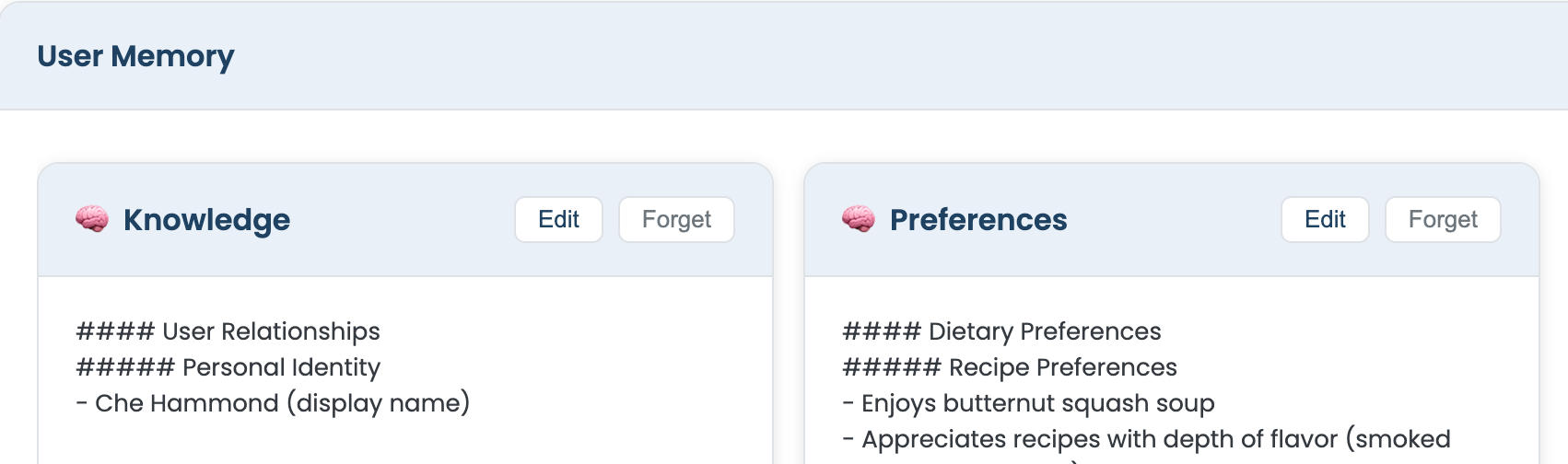
Users can see and control what is stored. The assistant exposes this through conversation and HTTP.
View
When the user asks a broad question about what the system knows—e.g., “What do you know about me?” or “Show me your memories”—the model is instructed to call the showusermemory tool. That tool (ShowUserMemoryTool) loads memory from S3 (same three files, assembled) and returns two rich-element cards in the chat: one for knowledge, one for preferences. The tool description explicitly tells the model to use it only for broad requests and not for specific factual questions like “Who is my spouse?”; those are answered directly from the memory already in the system prompt, without invoking the tool.
override val description: String = """
    Displays a visual card showing everything Busy Family knows about the user.
    **ONLY invoke this tool when the user asks to see ALL stored knowledge or memories broadly**...
    **DO NOT invoke this tool for specific factual questions** like "Who is my spouse?"...
""".trimIndent()
So “view” is: load from S3, render as cards; the model does not need to regurgitate the full text in its reply.
Edit
The chat UI renders the memory cards with an “Edit” action. When the user edits and saves, the frontend sends a PUT to endpoints such as /families/{familyID}/memory/user-knowledge or .../memory/user-preferences. The backend receives the new body (plain text or a small JSON wrapper with a content field), then calls MemoryService.saveMemoryFile(familyID, filename, content). That method writes a new JSON envelope to S3 (same key as before), with an updated updatedAt and the new content. So editing is an overwrite of the existing object, not a patch.
Forget
“Forget” reuses the same PUT endpoint. The client sends an empty body (or empty content). The backend again calls saveMemoryFile with that empty string. The file remains in S3 (same key), but the narrative content is now empty, so the model effectively sees no information in that section until new memory is formed. No separate delete endpoint is required; empty content means “clear this bucket.”
9. How the Session Is Declared Complete: SQS and Inactivity Checks
Section 6 described how the InactivityTimerListener sends a lightweight message to an SQS FIFO queue each time a turn is emitted. The queue has a delay configured at the queue level—typically 15 minutes, aligned with the inactivity threshold. This section covers what happens when that delayed message becomes visible.
The message payload is the InactivityCheckMessage data class:
data class InactivityCheckMessage(
    val familyID: String,
    val sessionID: String,
    val turnTimestamp: Instant,
    val messageId: String  // UUID for FIFO deduplication
)
When the message becomes visible after the delay, the SessionInactivityCheckerHandler Lambda consumes it. The Lambda must determine whether the session is truly inactive. The SQS delay alone is not enough: the user might have sent another message five minutes after the first turn, and that newer turn would have enqueued its own delayed message. The Lambda therefore checks the last turn timestamp stored in the ValKey cache (the same conversation:{familyID} key used for session restoration). ValKey is Redis-compatible; the implementation uses a standard Redis client connecting to a ValKey cluster endpoint.
The cache stores turns as a LIST, with newest at the head (LPUSH). The Lambda fetches the full list with lrange, parses each element as a ConversationTurnEvent, and takes the first element as the most recent turn:
val cacheKey = "conversation:${message.familyID}"
val redis = redisConnection.sync()
val cached = redis.lrange(cacheKey, 0, -1)

if (cached.isEmpty()) {
    // Cache already cleared - either already summarized or TTL expired
    return
}

val turns = cached.map { json -> gson.fromJson(json, ConversationTurnEvent::class.java) }
val lastTurn = turns.first()  // Newest is at head
val timeSinceLastTurn = Duration.between(lastTurn.timestamp, Instant.now())

if (timeSinceLastTurn.seconds >= inactivityThresholdSeconds) {
    redis.del(cacheKey)
    snsClient.publish(PublishRequest.builder()
        .topicArn(snsTopicArn)
        .message(gson.toJson(mapOf("familyID" to message.familyID, "sessionID" to message.sessionID)))
        .build())
} else {
    // Still active - another turn came in after this message was queued
    // Silently discard; that newer turn will have its own delayed message
}
If the cache is empty, the session has already been summarized or the TTL has expired; the Lambda returns without publishing. If the last turn is older than INACTIVITYTHRESHOLDSECONDS (default 900), the Lambda clears the cache (to avoid double summarization) and publishes a SummarizationTrigger to the SNS topic. If the session is still active—another turn arrived after this SQS message was queued—the Lambda ignores the message. The newer turn will have enqueued its own delayed message, so the session will be checked again later.
FIFO queues with message deduplication (via the messageId field) ensure that rapid turns do not produce duplicate inactivity checks within the same MessageGroupId window. The deliberate choice in error handling is to not trigger summarization on cache or SNS errors: it is better to skip a session than to double-summarize or trigger on incomplete data.
10. Turn Storage at Rest: S3 Partitioned by Session
Kinesis Firehose delivers turn events to S3. The delivery stream is configured with dynamic partitioning so that records are written under a prefix derived from each record's familyID and sessionID. The resulting layout is:
s3://busy-family-agent-conversations/
  {familyID}/
    sessions/
      {sessionID}/
        turns/
          <firehose-generated-objects>
This is strictly separate from the memory namespace ({familyID}/memory/), which holds the three long-lived JSON files. Turn events live under {familyID}/sessions/{sessionID}/turns/ and are produced by Firehose. Firehose buffers records (e.g., 60 seconds or 1 MB) and may bundle multiple turn events into a single S3 object, so a single object can contain one JSON event or several concatenated JSON objects.
The ConversationSummarizerHandler (the orchestrator) loads all turns for a given session with a single prefix-based listing:
private fun loadSessionTurns(familyID: String, sessionID: String, logger: LambdaLogger): List<ConversationTurnEvent> {
    val prefix = "$familyID/sessions/$sessionID/turns/"
    val listRequest = ListObjectsV2Request.builder()
        .bucket(s3Bucket)
        .prefix(prefix)
        .build()
    val objects = s3Client.listObjectsV2(listRequest)
    // For each object: GetObject, parse JSON (single or concatenated), collect turns
}
Each turn is a ConversationTurnEvent (same schema as in section 6). Because Firehose may concatenate multiple events into one file, the handler must support both a single JSON object and concatenated JSON. The implementation tries single-object parsing first; if that fails, it splits on }{ and parses each fragment, handling the boundary braces for first, middle, and last objects.
Session partitioning matters for performance: loading all turns for a specific session is a single ListObjectsV2 call with a session-scoped prefix. No full-bucket scan or client-side filtering is required. The layout also makes it straightforward to reprocess a specific session later (e.g., when adding a new memory type) by publishing a synthetic SummarizationTrigger for that (familyID, sessionID) pair.
11. Memory Formation: Orchestrator and Specialized Lambdas
When the SessionInactivityCheckerHandler publishes to SNS, the ConversationSummarizerHandler Lambda is invoked. It acts as an orchestrator: it loads session turns from S3 (as described in section 10), builds a shared payload, and invokes three specialized summarization Lambdas asynchronously with InvocationType.EVENT:
invokeLambdaAsync(userKnowledgeLambda, payload, logger)
invokeLambdaAsync(userPreferencesLambda, payload, logger)
invokeLambdaAsync(conversationSummaryLambda, payload, logger)
Each invocation is fire-and-forget. The orchestrator does not await a response. If one Lambda fails to invoke (e.g., throttling), the error is caught and logged; the others still run. That keeps the orchestrator fast and avoids blocking the SNS consumer.
The payload passed to each Lambda is:
data class SummarizationPayload(
    val familyID: String,
    val sessionID: String,
    val turns: List<ConversationTurnEvent>,
    val existingContent: String?  // Each lambda loads its own existing content
)
The orchestrator sets existingContent = null. Each specialized Lambda loads its own prior content from S3 (if it exists), calls Bedrock with a tailored prompt, merges new insights with existing memory, and writes the updated file back to S3. That keeps the orchestrator's memory footprint small and lets each specialist handle its own merge logic independently.
The three handlers and their outputs:
- UserKnowledgeSummarizerHandler — Reads existing
userknowledge.json, calls Bedrock (Claude 3.5 Sonnet, up to 2000 tokens) with a prompt focused on factual extraction (relationships, dates, locations, work, household members). Merges with existing content and writesuserknowledge.json.
- UserPreferencesSummarizerHandler — Same pattern for
user_preferences.json; prompt focused on communication style, scheduling habits, dietary preferences, tone, and habits.
- LastConversationSummarizerHandler — Writes
conversation_summary.json; prompt focused on a narrative summary of what happened in the most recent conversation (500 tokens, shorter by design).
When isOnboarding = true in the SNS message, the orchestrator also invokes UserNextStepsSummarizerHandler, which produces usernextsteps.json. That file is consumed exactly once by the conversation service on the first post-onboarding session (see section 2) and then archived.
12. Extensibility and Scalability via Serverless Lambdas
The Lambda-based architecture yields several benefits for extensibility and scalability.
Adding a new memory type. To introduce a fourth (or fifth) memory file—e.g., an "emotional tone" tracker or a "goals and projects" file—the steps are: (1) implement a new Lambda handler with its own Bedrock prompt and S3 write path, (2) add an environment variable for its function name, and (3) add one line in the orchestrator: invokeLambdaAsync(newLambda, payload, logger). Nothing else changes. The conversation service, the SQS inactivity check, the SNS trigger, and the existing summarizers are unaffected.
Retroactive reprocessing. Turns are stored durably in S3 under their session prefix and are not deleted as part of normal operation. An operator can publish a synthetic SummarizationTrigger SNS message for any past (familyID, sessionID) pair. The orchestrator loads those turns and invokes all summarization Lambdas. A new memory type can thus bootstrap from existing conversations without re-collecting data.
Parallel, independently-scaled execution. Because the orchestrator uses InvocationType.EVENT (asynchronous invocation), all summarization Lambdas run in parallel and scale independently. A slow or memory-heavy knowledge extraction run does not block the faster conversation-summary Lambda. Each Lambda can be configured with its own timeout and memory size (e.g., 900 seconds and 1024 MB for the heavier extractors, lighter settings for the short summary).
Fault isolation. An exception in invokeLambdaAsync is caught and logged; the other invocations still proceed. AWS Lambda's built-in retry policy (two retries by default for async invocations) provides additional resilience. A Dead Letter Queue can be attached per function for failure observability without complicating the orchestrator.
Cost alignment. Lambda billing is per-invocation and per-GB-second. Memory formation runs only after a session ends, not on every turn. The total memory-formation workload scales linearly with the number of completed sessions, not with message volume within a session.
13. Conclusion
The Busy Family agent's memory design centers on a few choices:
- Storage: Three S3 files per family (knowledge, preferences, last conversation summary) plus a one-time onboarding file that is consumed and archived.
- Shape: Memory is presented to the model as structured markdown in the system prompt, with clear sections so the LLM can use it reliably.
- Loading: Memory is loaded from S3 when a new session starts (or on handoff); it is skipped when restoring from a fresh Redis cache.
- Injection: Memory is prepended to the system prompt and is never emitted as a turn, avoiding re-summarization downstream.
- Capture: Every user and assistant turn is sent to Kinesis Firehose; a delayed SQS message per turn signals session completion so the memory Lambda knows when to check if summarization should run; the conversation service does not form or write memory itself.
- Transparency: Users can view memory via a tool, and edit or clear it via the same
PUTendpoints that write the JSON envelopes to S3. - Inactivity check: The
SessionInactivityCheckerHandlerLambda consumes delayed SQS messages and verifies true inactivity by comparing the last turn timestamp in ValKey/Redis against the threshold before publishing to SNS—avoiding partial summaries mid-conversation. - Turn storage: Firehose delivers turns to S3 under
{familyID}/sessions/{sessionID}/turns/, enabling efficient session-scoped loading and retroactive reprocessing when adding new memory types. - Memory formation: The
ConversationSummarizerHandlerorchestrator loads turns from S3, then invokes three specialized summarization Lambdas asynchronously (knowledge, preferences, last conversation); each writes its own S3 file. That pipeline turns raw conversation into the markdown the agent reads. - Extensibility: The Lambda-based design allows new memory types to be added with minimal changes, supports retroactive extraction from existing sessions, and provides parallel execution with fault isolation and cost-aligned scaling.