Always in Sync: Realtime Calendar Updates and Semantic Event Search
How webhooks and embeddings power the Busy Family calendar pipeline.
This post describes two architectural pillars of the Busy Family calendar system:
- Webhook-driven realtime ingestion
- Semantic indexing and vector search
The first ensures the assistant’s view of the calendar is fresh. The second ensures it is meaningfully searchable.
Part I — Realtime Event Ingestion (Push, Not Poll)
Polling is simple. It is also slow, wasteful, and guarantees staleness.
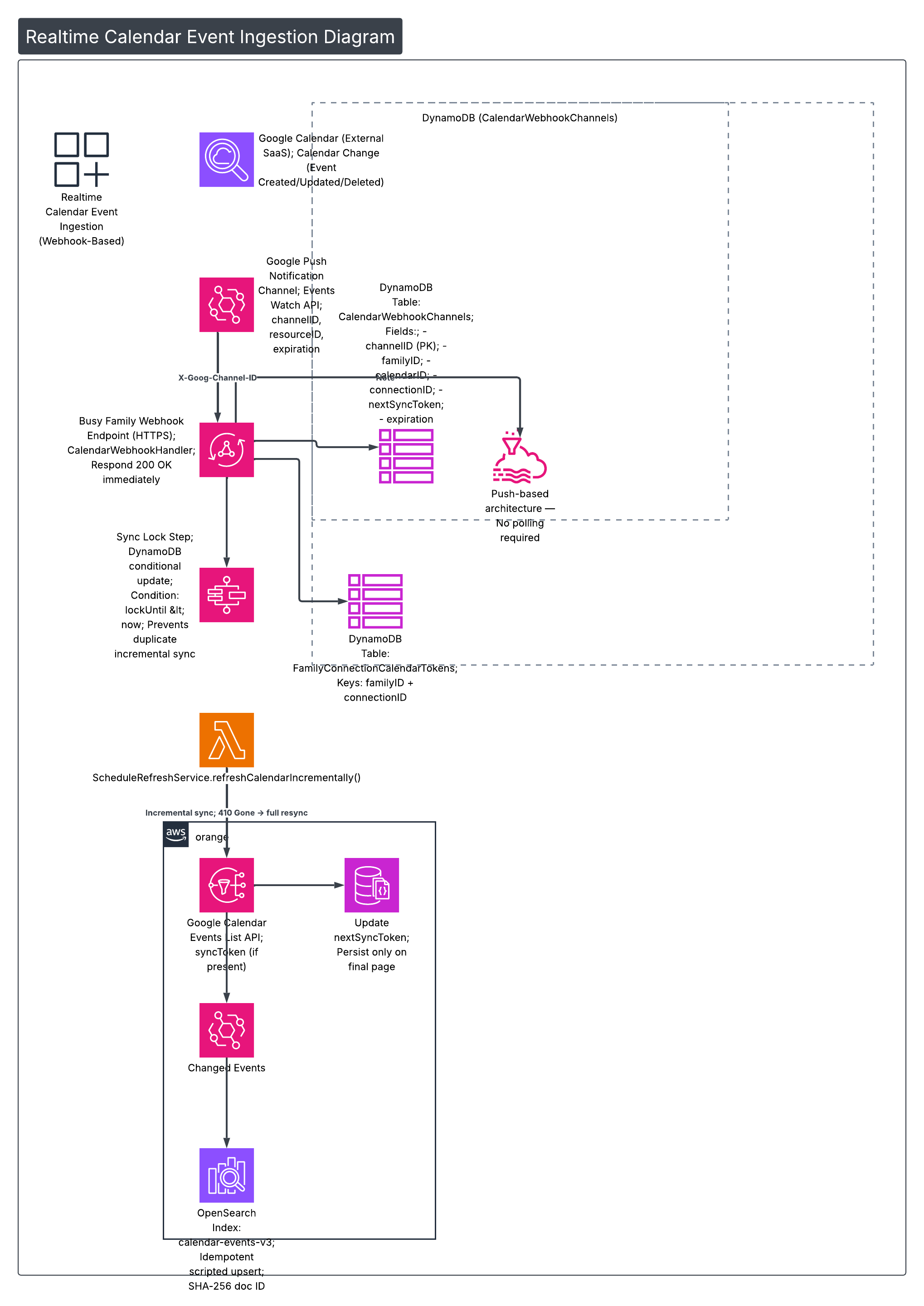
Instead, Busy Family uses Google Calendar push notification channels. When a calendar changes, Google notifies our webhook immediately. That notification triggers a safe, incremental synchronization process.
The flow looks like this:
1️⃣ Channel Registration
During onboarding, when a user selects calendars to manage:
- We call the Google Calendar Events Watch API
- We provide:
- A UUID
channelID - Our HTTPS webhook endpoint
- Google returns:
resourceIDexpiration(≈ 7 days)
We persist this to DynamoDB:
Table: CalendarWebhookChannels
channelID(PK)familyIDcalendarIDconnectionIDresourceIDnextSyncTokenexpirationcreatedAt
A GSI on familyID allows renewal and cleanup operations.
This establishes push-only semantics. No polling fallback required.
2️⃣ Multi-Account Isolation
A family may connect multiple Google accounts.
Each OAuth connection has a stable connectionID (Google UserInfo id).
Tokens are stored in:
Table: FamilyConnectionCalendarTokens
- Partition key:
familyID - Sort key:
connectionID
Each webhook channel stores its owning connectionID.
When a webhook fires:
- We resolve the channel
- Then fetch the correct access token
- Tokens are never mixed across accounts
Failure in one account does not hide calendars from others.
3️⃣ Webhook Handling + Sync Lock
When Google sends a notification:
CalendarWebhookHandlerreadsX-Goog-Channel-ID- Loads the channel from DynamoDB
- Immediately responds
200 OK
Processing happens asynchronously.
Before starting a sync, we attempt to acquire a distributed sync lock using a DynamoDB conditional update:
lockUntil < nowIf another sync is running, we exit gracefully.
This prevents duplicate incremental work during rapid notification bursts.
4️⃣ Incremental Sync via nextSyncToken
The sync step calls:
ScheduleRefreshService.refreshCalendarIncrementally()
If nextSyncToken exists:
- We pass it to Google’s Events List API
- Google returns only changed events
Important behaviors:
- Paging may occur
nextSyncTokenis returned only on the final page- We persist the new token after full pagination
If Google returns 410 Gone:
- The sync token expired
- We perform a full resync
- We do not persist a token
- The next run starts fresh
The first notification after channel creation has resourceState = "sync":
- We perform a full fetch
- Then store the initial
nextSyncToken
At this point we have:
A minimal, incremental set of changed events.
5️⃣ Idempotent OpenSearch Writes
Changed events are written to:
OpenSearch index: calendar-events-v3
Document IDs are:
SHA-256(calendarID + eventIdentity + familyID)This guarantees deterministic, collision-resistant IDs.
We use a scripted upsert:
- A Painless script compares event fingerprint
- If content unchanged → skip write
- Prevents write amplification
Now the event store is updated.
That handles freshness.
Part II — Semantic Indexing Pipeline
Fresh data is not enough. It must be searchable by meaning.
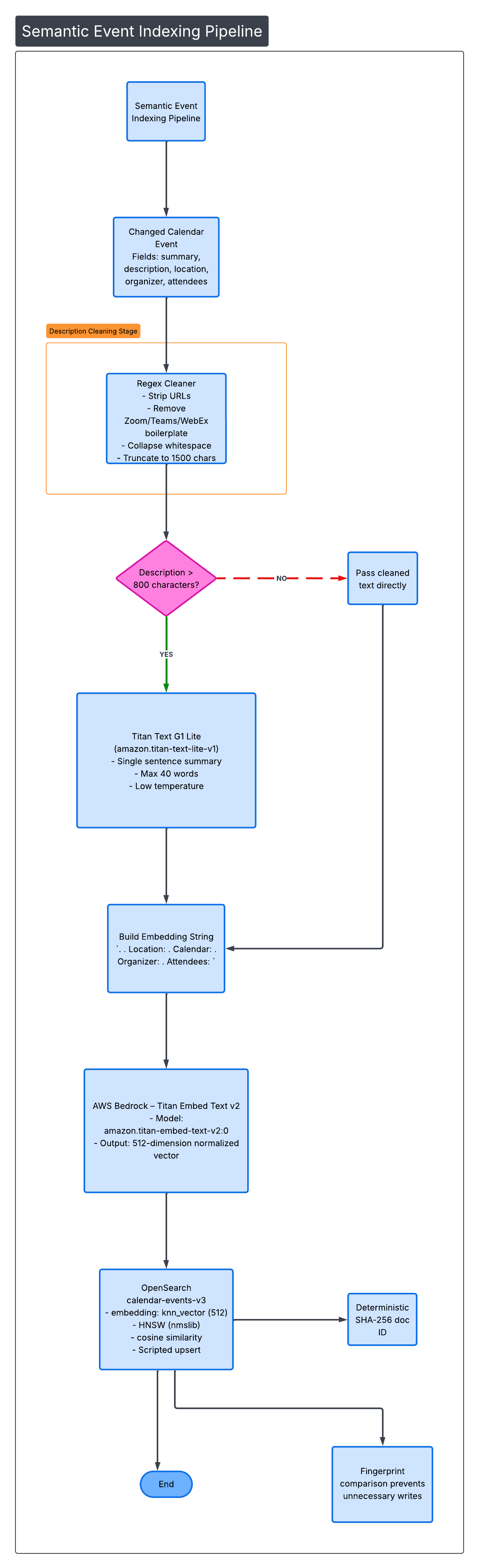
Each changed event goes through a structured embedding pipeline.
6️⃣ Description Cleaning (Signal Over Noise)
Calendar descriptions are noisy.
They include:
- Zoom join links
- Teams dial-ins
- HTML artifacts
- Tracking URLs
We apply a two-stage cleaner.
Stage 1 — Regex Cleaner
- Strip URLs
- Remove meeting boilerplate
- Collapse whitespace
- Truncate to 1,500 chars
Stage 2 — Optional Titan Summarization
If cleaned text > 800 characters:
We send it to:
Titan Text G1 Lite amazon.titan-text-lite-v1
Prompt constraints:
- Single sentence
- Max 40 words
- ≤ 80 output tokens
- Low temperature
- Preserve purpose + people + context
- Do not invent time or location
This preserves semantic density while removing noise.
7️⃣ Embedding Construction
We build a single embedding string:
<summary>. <cleanedDescription>.
Location: <location>.
Calendar: <calendarDisplayName>.
Organizer: <organizer>.
Attendees: <attendee1>, <attendee2>
All top-level sections are joined with ". ".
Capped at 1,800 characters.
8️⃣ Vector Generation (Bedrock)
We send this string to:
Titan Embed Text v2 amazon.titan-embed-text-v2:0
Output:
- 512-dimensional
- Normalized vector
This becomes the embedding field in OpenSearch.
9️⃣ OpenSearch Configuration
Index: calendar-events-v3
- Field:
embedding - Type:
knn_vector - Dimensions: 512
- Engine: HNSW (nmslib)
- Similarity: cosine
Now the event is searchable semantically.
Part III — Semantic Retrieval
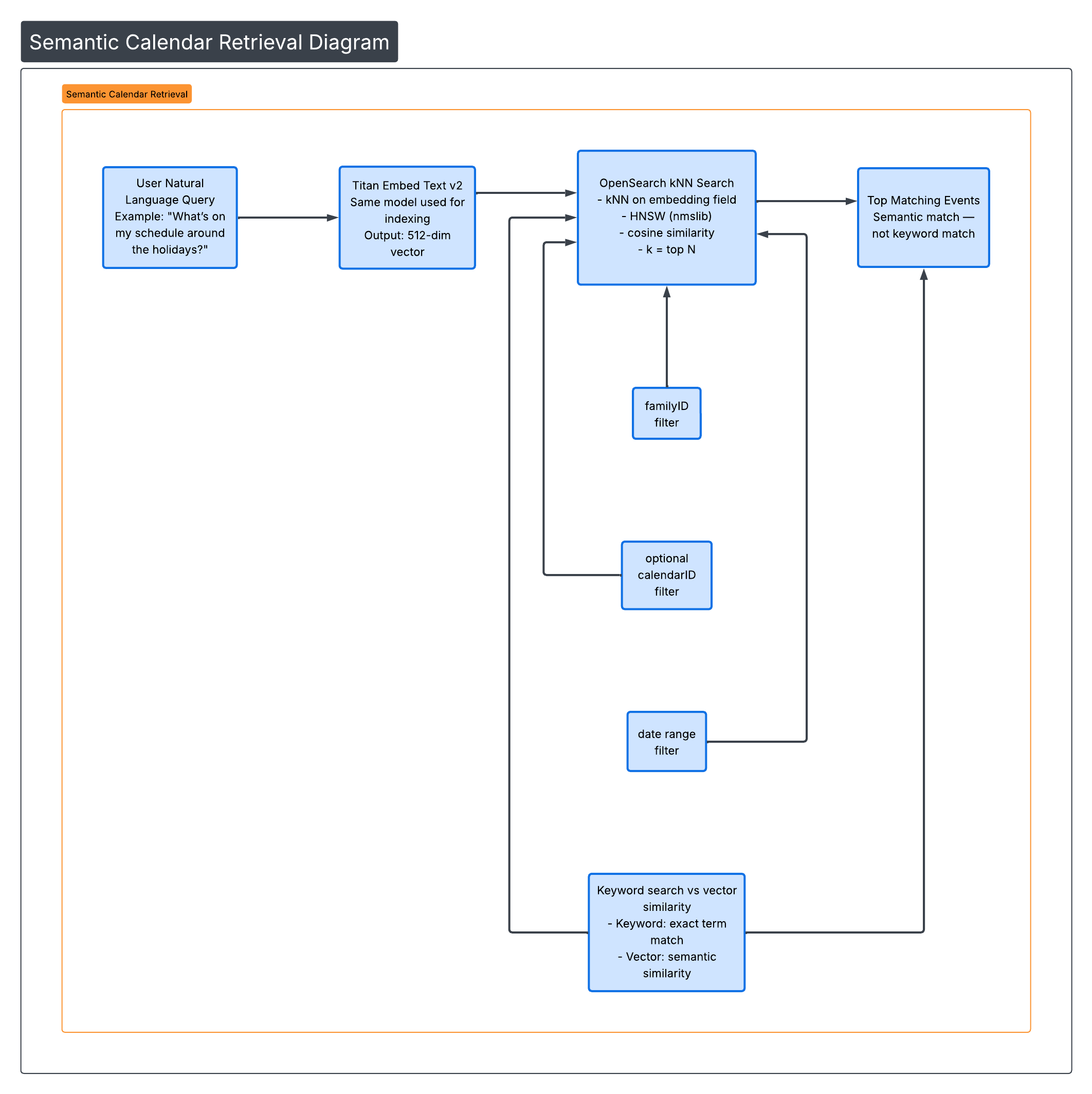
When a user asks:
“What’s on my schedule around the holidays?”
The system:
- Embeds the query using Titan Embed v2
- Performs kNN search against
embedding - Applies filters:
familyID- optional
calendarID - date range
Results are returned based on vector similarity — not keyword match.
An event titled:
“Grandma’s House — Dec 24”
can match “holidays” even if that word never appears.
This is semantic retrieval.
Architecture Summary
The full system combines:
🔄 Push-Based Realtime Ingestion
- Webhook channels
- Incremental sync
- Distributed locking
- Idempotent upserts
🧠 Dense Semantic Indexing
- Noise reduction
- Optional summarization
- 512-dim embeddings
- HNSW kNN search
Together, the result is:
- No polling lag
- No stale calendar views
- No keyword-only limitations
- Meaning-based retrieval
The family calendar is:
Always fresh. Always meaningfully searchable.