Teach It Once. Let It Run.
How Busy Family Teaches an AI Assistant to Do Your Recurring Work
Overview
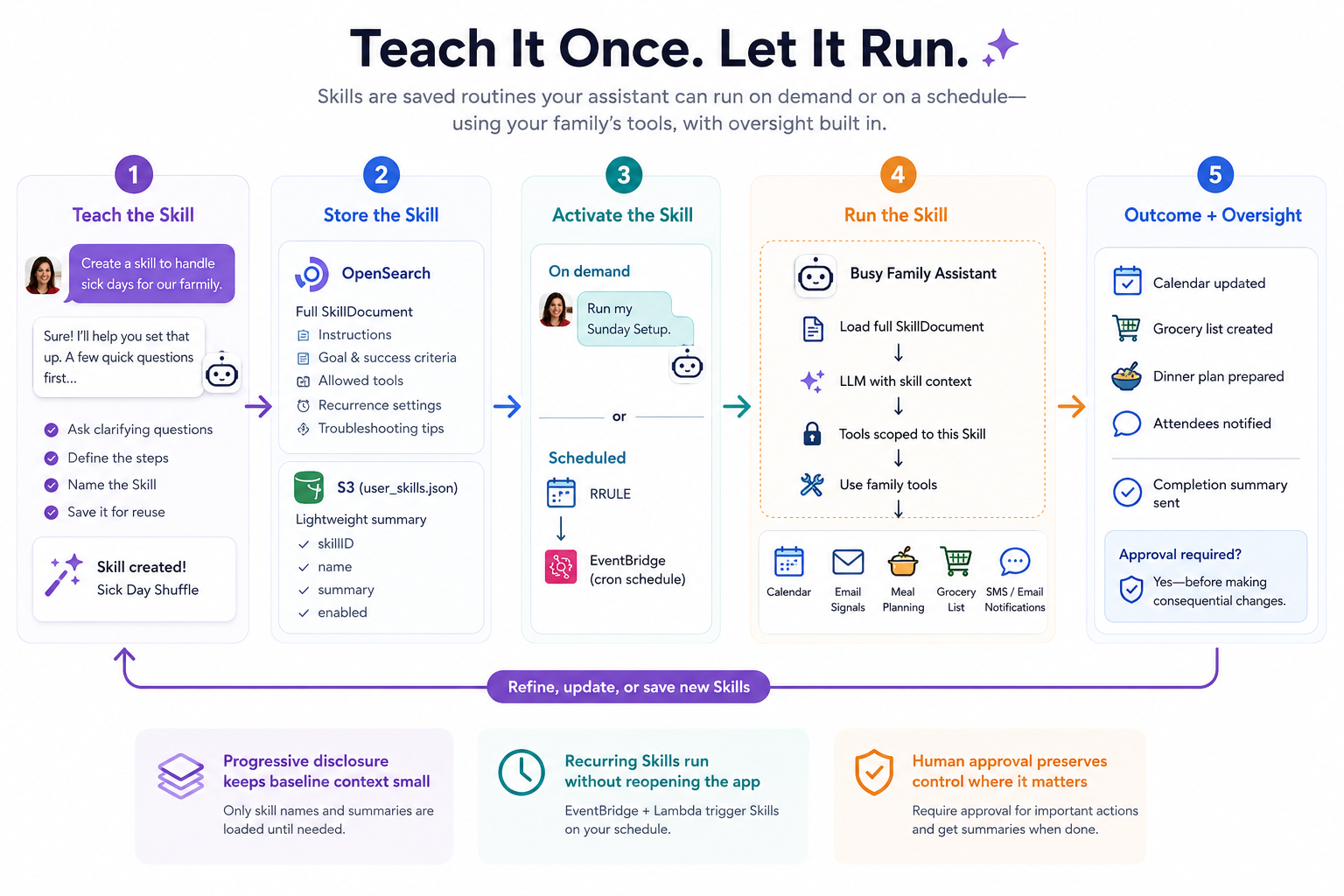
Skills are Busy Family's mechanism for turning a family's assistant into something with institutional memory: a set of named, saved procedures the LLM can invoke on demand or on a recurring schedule, with full access to the family's tools — calendar, email signals, meal planning, attendee notifications, and more. This post walks through the technical decisions behind how Skills are represented, stored, discovered, executed, scheduled, and how we preserve human oversight even in fully automated runs.
The Skill Document
Every Skill is persisted as a SkillDocument, a Kotlin data class that acts as the single source of truth for everything the LLM needs to run the procedure.
data class SkillDocument(
    val skillID: String,           // UUID, server-generated
    val familyID: String,          // Tenant isolation key
    val name: String,              // Short display name — e.g. "Sick Day Shuffle"
    val summary: String,           // One sentence for UI list and memory context
    val description: String,       // Longer description, used for semantic search
    val instructions: String,      // Step-by-step execution guide for the LLM
    val tools: List<String>,        // Tool names this skill is allowed to use
    val goal: String,              // What successful execution achieves
    val successCriteria: String,   // Measurable definition of done
    val troubleshootingTips: List<String>,
    val recurrence: SkillRecurrence,
    val maxTurns: Int?,             // Optional turn-limit override
    val enabled: Boolean,
    val version: Int,
    val audit: SkillAudit
)
Why goal, successCriteria, and troubleshootingTips matter
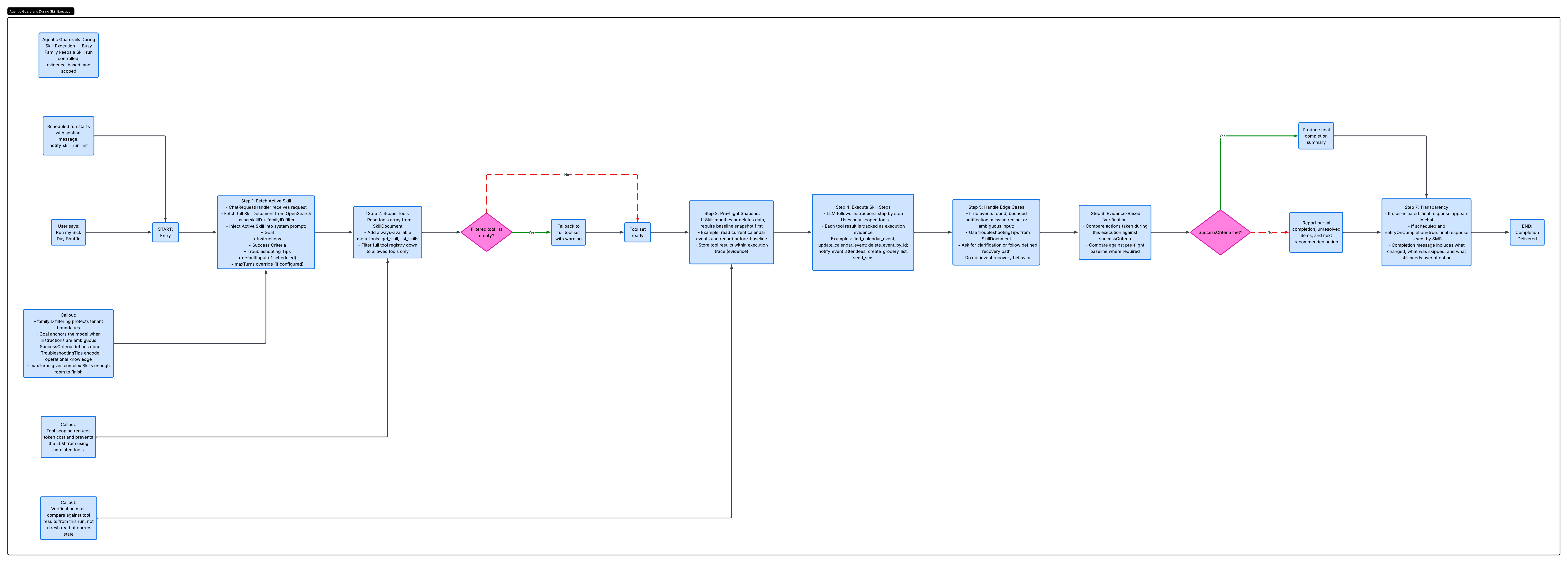
Most agentic systems give the LLM a prompt and let it figure out when it is done. We take a different approach. The three fields above are first-class citizens in the execution context, and they do real work:
goal is injected verbatim into the LLM's system context at the start of every skill run:
Goal: Cancel or decline the day's commitments, reschedule what can wait,
and notify all affected attendees by SMS and email.
It gives the model a high-level anchor it can fall back on when a specific instruction step is ambiguous, rather than making the model guess at intent from the instructions alone.
successCriteria is what the model uses to write its own verification step. The instructions convention we enforce (described below) requires the final step of every skill to compare actual tool results against the baseline captured at the start of the run — not to re-read state and check whether it "looks correct." This prevents a subtle but common agentic failure mode: the model observes the current state of the world after making changes, concludes the state "looks fine," and reports success — even when it has no way of knowing whether its own actions caused that state or it was already that way. By embedding successCriteria in the system context and requiring the verification step to reference prior tool results, we eliminate that ambiguity.
troubleshootingTips are injected as a bulleted list alongside the instructions. On a normal run they do nothing; on edge-case runs (no events found on the calendar, a recipe that doesn't match any night's constraints, a notification that bounces) they give the LLM specific guidance rather than leaving it to hallucinate a recovery path. Authoring good troubleshooting tips is how skill authors encode operational knowledge that would otherwise live only in a human's head.
The instructions authoring convention
All Skill instructions follow a convention enforced by both CreateSkillTool and UpdateSkillTool:
- The first line is an Inputs: statement:
Inputs: the date the user providesor - Step 1 is always
Extract [X] from the user's messageor the no-input equivalent. - Skills that modify or delete existing data must include a pre-flight snapshot step:
No user input is needed — proceed with the following steps.
"Get the current state of [calendar / list] and record it as your before-baseline." The final verification step must then compare against that baseline, not against a fresh read.
This convention was born out of a real failure: an early skill that cancelled calendar events would re-read the calendar afterward to verify the cancellations, find no events, and report success — but would do exactly the same thing on a re-run, reporting "success" on an already clean calendar. The snapshot/baseline pattern makes the verification step evidence-based rather than state-based.
maxTurns
By default, the LLM has a global turn limit on how many tool calls it can make in a single request. A complex skill — one that finds events, cancels some, reschedules others, notifies ten attendees — can easily exceed that limit and truncate mid-run. maxTurns is an optional per-skill override that raises the ceiling. The effective limit is always max(skill.maxTurns, systemDefault) — a skill can only increase the ceiling, never lower it. When authoring a skill, the convention is to count the expected distinct tool invocations and add 30% headroom.
Storage: Two Layers Working Together
Skills use a two-tier storage architecture that separates the fast-path context needed on every conversation turn from the full definition only needed at execution time.
Layer 1: OpenSearch (family-skills-v1 index)
The full SkillDocument — including instructions, goal, successCriteria, and all recurrence config — is persisted as a document in an OpenSearch index keyed by skillID. Critically, at save time the OpenSearchSkillDataSource generates a 512-dimensional embedding from the concatenation of the skill's name, description, and goal:
val embedding = embeddingService.embed("${skill.name}. ${skill.description}. ${skill.goal}")This embedding is stored in a knn_vector field in the index, enabling semantic search over skills when needed (more on this below). The index mapping uses HNSW with cosine similarity (space_type: "cosinesimil") via the nmslib engine.
Tenant isolation is enforced at the query level, not the application level. Even though the document _id is the skillID, getBySkillID never uses OpenSearch's direct GET /{index}/{id} API (which would retrieve any document matching that ID regardless of family). Instead it issues a Search with a bool filter that combines an ids query with a term filter on familyID:
val query = Query.of { q ->
    q.bool { b ->
        b.filter(listOf(
            idsQuery(skillID),
            termQuery("familyID", familyID)
        ))
    }
}
OpenSearch itself enforces the tenant boundary — a correct-looking skillID belonging to another family returns zero hits rather than a document the application must then discard. The same ids + familyID filter pattern is applied to deleteByQuery, so a cross-family delete attempt is a no-op at the index level rather than a data corruption risk.
Layer 2: user_skills.json in S3
OpenSearch is the authoritative store, but reading it on every conversation turn is expensive. The second layer is a lightweight JSON file stored in S3 at:
{familyID}/memory/user_skills.jsonThis file contains only the metadata the LLM needs to discover a skill — skillID, name, summary, and enabled flag — mirroring the pattern used for user_documents.json:
{
  "skills": [
    {
      "skillID": "8f2a1c4e-...",
      "name": "Sick Day Shuffle",
      "summary": "Cancels or reschedules the day's commitments and notifies attendees.",
      "enabled": true
    },
    {
      "skillID": "3b9d7f1a-...",
      "name": "Sunday Setup",
      "summary": "Turns flagged school emails into calendar events, plans the week's meals, and builds the grocery list.",
      "enabled": true
    }
  ]
}
SkillStorageService manages this file via the AWS SDK v2 async S3 client. It is written on every create/update/delete, providing a fast, consistent cache that is always in sync with OpenSearch.
Progressive Disclosure and Semantic Search
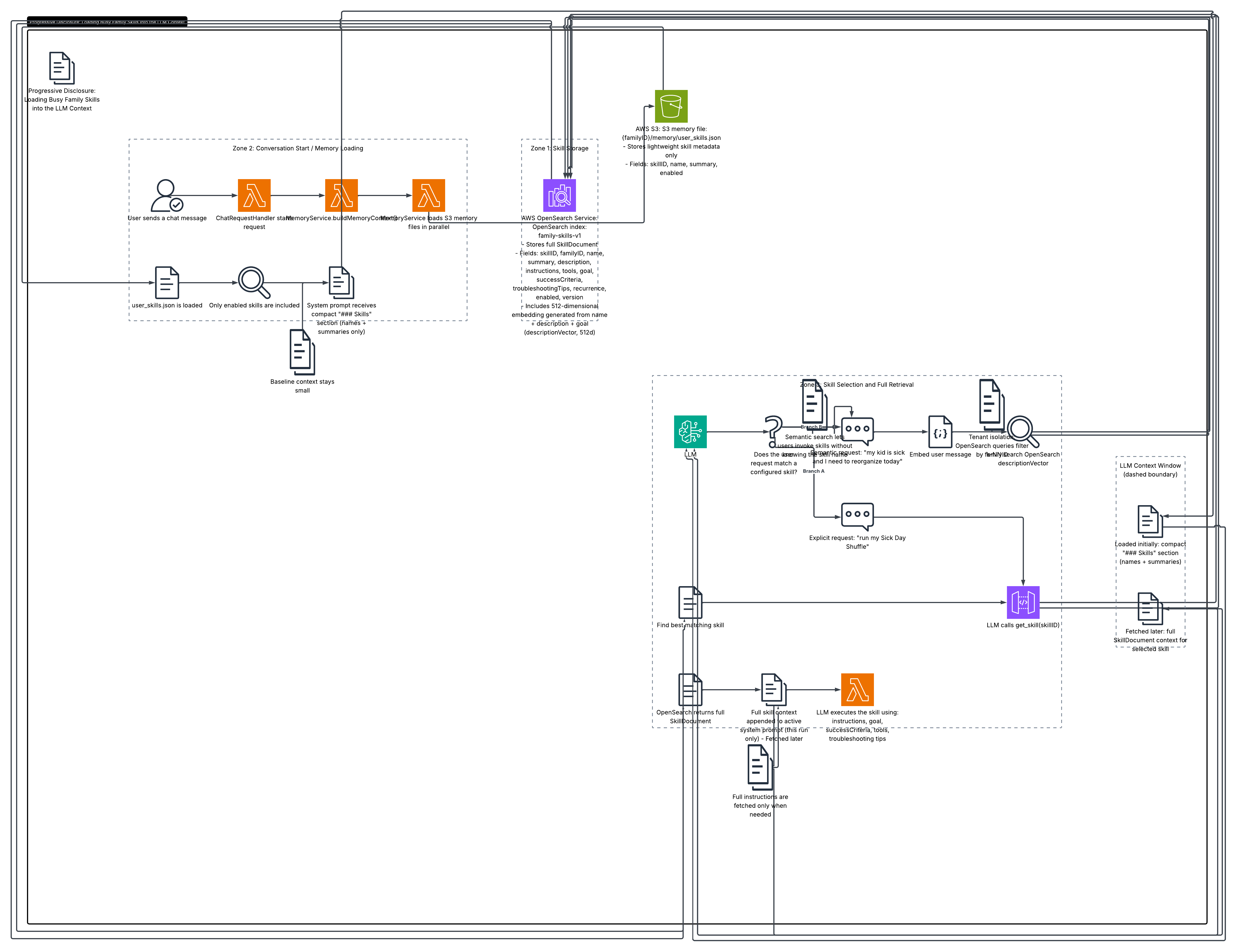
The skill context is threaded into the LLM's memory through MemoryService.buildMemoryContext(), which assembles the system prompt's ## User Memory section from several S3 files loaded in parallel at conversation start. The user_skills.json is one of those files. Only enabled skills are included.
The resulting section in the system prompt looks like this:
### Skills
The family has configured the following skills. When the user's request matches a skill,
or they say "run my X skill", fetch the full skill definition with `get_skill` before
executing it. Use the user's message as input to the skill's instructions.

- **Sick Day Shuffle**: Cancels or reschedules the day's commitments and notifies attendees.
- **Sunday Setup**: Turns flagged school emails into calendar events, plans the week's meals,
  and builds the grocery list.
This is progressive disclosure: the LLM sees only names and one-line summaries in its baseline context. The full instructions, goal, successCriteria, tools list, and recurrence configuration live in OpenSearch and are only fetched via get_skill when the LLM decides a skill is relevant. This keeps the system prompt compact regardless of how many skills a family has configured (up to the 20-skill limit), deferring token cost to the moment it is actually needed.
When the user explicitly invokes a skill by name ("run my sick day shuffle"), the LLM calls get_skill with the skillID. But what about the semantic case — a user who describes a situation without naming a skill? The descriptionVector stored in OpenSearch makes this possible: the system can embed the user's message and run a k-NN query against the family-skills-v1 index to surface the skill whose (name + description + goal) vector is most semantically similar to what the user described. This is how a user saying "I need to reorganize my whole day, my kid is home sick" can match "Sick Day Shuffle" without knowing the skill exists.
Recurrence: RRULE to EventBridge Cron
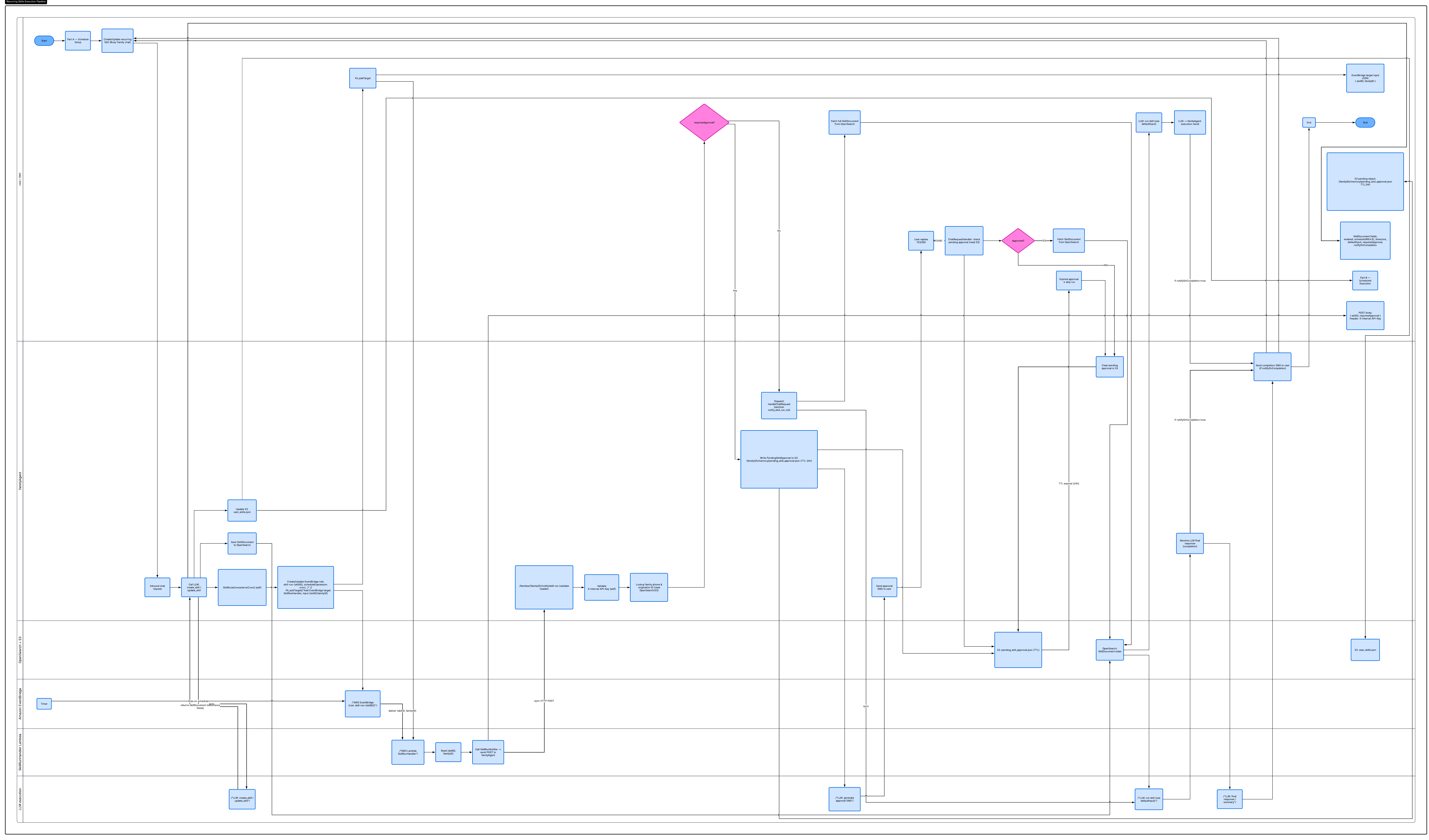
Skills support recurring execution via a SkillRecurrence sub-document:
data class SkillRecurrence(
    val enabled: Boolean = false,
    val schedule: String?,          // RRULE — e.g. "RRULE:FREQ=WEEKLY;BYDAY=SU"
    val timezone: String?,          // IANA — e.g. "America/Los_Angeles"
    val defaultInput: String?,      // Natural-language default for unattended runs
    val notifyOnCompletion: Boolean = false,
    val requiresApproval: Boolean = false,
    val eventBridgeRuleName: String?
)
The schedule field stores a standard RRULE string. When a skill with recurrence is created or updated, CreateSkillTool calls SkillRruleConverter.toCron() to translate the RRULE into an AWS EventBridge cron expression, then creates an EventBridge rule via the SDK v2 sync EventBridgeClient:
// RRULE:FREQ=WEEKLY;BYDAY=SU  →  cron(0 17 ? * SUN *)
val cronExpression = SkillRruleConverter.toCron(recurrence.schedule, utcHour, utcMinute)

eventBridgeClient.putRule(
    PutRuleRequest.builder()
        .name("skill-run-$skillID")   // Rule name is stable and tied to skillID
        .scheduleExpression(cronExpression)
        .state(RuleState.ENABLED)
        .build()
)

// Target payload: just skillID and familyID — the Lambda fetches everything else
eventBridgeClient.putTargets(
    PutTargetsRequest.builder()
        .rule(ruleName)
        .targets(
            Target.builder()
                .id("skill-run-target-$skillID")
                .arn(skillRunHandlerArn)
                .input("""{"skillID":"$skillID","familyID":"$familyID"}""")
                .build()
        )
        .build()
)
The eventBridgeRuleName (always skill-run-{skillID}) is stored back in the SkillDocument so that UpdateSkillTool and DeleteSkillTool can tear down and recreate the rule when the schedule changes, or clean it up on deletion via removeTargets + deleteRule.
SkillRruleConverter currently supports three patterns:
| RRULE | EventBridge cron |
|---|---|
FREQ=DAILY |
cron(m h * ? *) |
FREQ=WEEKLY;BYDAY= |
cron(m h ? * |
FREQ=WEEKLY;BYDAY=MON,TUE,WED,THU,FRI |
cron(m h ? * MON-FRI *) |
These cover the core family use cases — weekday morning routines and single-day weekly jobs — without the complexity of full RRULE semantics.
The Recurring Execution Pipeline
When an EventBridge rule fires, the execution path traverses three services:
EventBridge Rule fires
        │
        ▼
  SkillRunHandler (Lambda in familyLambda/smart-reminders)
        │   reads: skillID, familyID from event Input JSON
        │
        ▼
  SkillRunNotifier (HTTP POST)
        │   POST /families/{familyID}/notify/skill-run
        │   body: { "skillID": "...", "requiresApproval": false }
        │   header: X-Internal-API-Key
        │
        ▼
  familyAgent /notify/skill-run endpoint (NotifySkillRun.kt)
        │
        ├─ requiresApproval=true  →  approval SMS path (see below)
        └─ requiresApproval=false →  direct skill run
SkillRunHandler is a Kotlin Lambda (RequestHandler) deployed in the familyLambda project. Its only job is to bridge EventBridge to familyAgent: it reads the two-field payload from the event, calls SkillRunNotifier.notify(), and logs the HTTP response code. The Lambda is deliberately thin — it holds no skill logic and no state.
SkillRunNotifier is an OkHttp client that POSTs to familyAgent's internal /notify/skill-run endpoint, authenticated with X-Internal-API-Key. The endpoint is not exposed publicly.
/notify/skill-run in familyAgent (configured via configureSkillRunNotifyRouting()) does the actual work. It validates the API key, looks up the family's phone number and origination ID (for SMS dispatch), then branches on requiresApproval:
requiresApproval=false: dispatcheshandleChatRequestwith the sentinel message
__notify_skill_run_init__ and the skill's skillID. This is identical to a user-initiated skill run — the same tool filtering, same context injection, same maxTurns limit — except the "user" message is the skill's defaultInput from the SkillRecurrence configuration.
requiresApproval=true: saves aPendingSkillApprovalrecord to S3 at
{familyID}/memory/pendingskillapproval.json with a 24-hour TTL, then dispatches a __notify_skill_approval_init__ to the LLM, which generates a personalized approval SMS and sends it to the family's phone number.
All execution runs asynchronously in a CoroutineScope(Dispatchers.IO).launch block; the Lambda endpoint returns 202 Accepted immediately while the skill runs in the background.
Human-in-the-Loop: Two Modes via SMS
Human oversight on recurring Skills works entirely over SMS — the same channel families already use to interact with Busy Family. There is no separate approval UI.
Pre-run approval (requiresApproval = true)
When the EventBridge rule fires, before any tools are called:
- A
PendingSkillApprovalis written to S3 with theskillID,skillName, and an expiry - The LLM generates and sends an approval SMS: *"Your 'Sunday Setup' skill is scheduled to run.
- The next inbound SMS from that family is checked by
ChatRequestHandleragainst the pending - If no reply arrives within 24 hours, the
PendingSkillApprovalis treated as expired on the
24 hours out.
Reply YES to proceed or NO to skip."*
approval before any other message handling. A YES dispatches the skill run; a NO dismisses the record.
next check and the run is silently skipped.
// PendingSkillApproval stored at {familyID}/memory/pending_skill_approval.json
data class PendingSkillApproval(
    val skillID: String,
    val familyID: String,
    val skillName: String,
    val expiresAt: String   // ISO-8601 instant, 24 hours from creation
)
The approval record is stored in S3 (not DynamoDB) deliberately — it lives in the same memory namespace as the rest of the family's context, where MemoryService can load and clear it as part of normal conversation state management, without requiring a separate database table for a feature that fires at most once per skill per schedule period.
Post-run notification (notifyOnCompletion = true)
When a skill with notifyOnCompletion=true finishes execution, the LLM's final response message is delivered to the family as an SMS. This is not a generic "your skill ran" ping — it is the LLM's own structured completion message, the same one it would produce for a user who ran the skill manually in the chat UI. For a weekly dinner planner skill, that means the SMS contains the actual meal assignments and a note that the grocery list is ready.
This is a deliberate product choice: we use post-run notification as a transparency mechanism. Families who configure fully automated skills get a receipt of what was done on their behalf, preserving the sense of oversight without requiring them to be present for the run.
Tool Scoping During Execution
A subtle but important detail: when a skill is active, the LLM's available tool set is filtered to only the tools declared in the skill's tools array, plus two always-available meta-tools: get_skill and listskills. The full tool list has on the order of 60 registered tools; running with all of them in scope during a skill execution would both increase prompt token cost and create risk of the LLM reaching for a tool outside the skill's intended scope.
val skillToolNames = (activeSkillDocument.tools + listOf("get_skill", "list_skills")).toSet()
val filteredTools = toolConfiguration.getTools().filter { it.name in skillToolNames }
If the filtered list would be empty (a skill with an empty or unrecognized tools array), the system falls back to the full tool set rather than leaving the LLM with nothing to work with.
Context Injection at Runtime
When a skill is running — whether triggered by a user message or by the __notify_skill_run_init__ sentinel — ChatRequestHandler fetches the full SkillDocument from OpenSearch and appends a skill context block to the system prompt:
## Active Skill: Sick Day Shuffle
The user has activated this skill. Follow its instructions, using the user's message as input
where specified.

IMPORTANT — Execution tracking: As you work through each step, mentally track every action
you take and its result. When you reach the verification step, use the tool results you received
during THIS execution as your ground truth for success — do not question whether a state you
observe "was always like that."

Goal: Cancel or decline the day's commitments...
Instructions:
  Inputs: the date the user provides (defaults to today)
  Step 1: Extract the date...
  ...
Success Criteria: All events on the given date that could not be attended have been cancelled
  or declined, each affected attendee has received a notification, ...
Troubleshooting:
  - If no events are found for the date, confirm the date with the user before reporting done.
  ...
Available tools this turn: find_calendar_event, delete_event_by_id, update_calendar_event,
  notify_event_attendees, get_skill, list_skills
The defaultInput from SkillRecurrence is appended as a note when no user message is present (scheduled runs), so the LLM knows what to substitute when the instructions say "the user provides a date."
Lifecycle: Create, Update, Delete
The full skill lifecycle — including EventBridge rule management — is handled by three LLM-callable tools:
create_skill: generates a UUID server-side (the LLM is explicitly prevented from
supplying one), writes to OpenSearch, updates user_skills.json, and creates the EventBridge rule if recurrence.enabled. The tool enforces a two-phase authoring flow: the LLM must complete a structured conversation before it is permitted to call the tool.
update_skill: reads the existing document, merges the suppliedupdatesobject, handles
EventBridge rule teardown and recreation if the recurrence schedule changed, increments version, and re-saves to both OpenSearch (generating a new embedding) and user_skills.json. Changes to instructions, goal, or recurrence require a re-confirmation step with the user.
delete_skill: removes EventBridge targets and the rule (removeTargetsthendeleteRule),
deletes the OpenSearch document, and removes the entry from user_skills.json.
The 20-skill limit is enforced at create time via an OpenSearch count query (countByFamilyID).
Notable Implementation Details
- The
SkillRruleConverteris server-authoritative. The RRULE→cron translation happens - The embedding field covers name + description + goal (not instructions). This is an
PendingSkillApprovalin S3, not DynamoDB. The approval record lives in the family's- The sentinel message pattern (
__notify_skill_run_init__) is how the system triggers an - Tool filtering is per-skill, not role-based. Tools are scoped by what the skill author
server-side in familyAgent, not client-side. The EventBridge rule is created directly from the agent service at skill-creation time. This means there is a tight coupling between the agent's runtime AWS credentials and EventBridge rule management, which could be architecturally significant to call out (or not) depending on audience.
intentional choice: instructions are operational detail, not the semantic identity of a skill. Embedding the description and goal captures "what this skill does and why" rather than "how it does it." Worth discussing: whether this embedding strategy is effective for semantic matching in practice, and whether it is novel enough to highlight.
memory S3 namespace rather than a dedicated table. The rationale is co-location with the rest of the family's conversational context. This is a lightweight pattern that avoids table proliferation, but it also means approval state is not queryable or auditable from outside the agent. Potentially worth discussing — either as a pragmatic design win or as a future improvement point.
LLM execution without a real user message. The ChatRequestHandler recognizes these tokens and routes them to the appropriate initialization path. This keeps the chat pipeline unified across user-initiated and system-initiated runs. Whether this is worth publishing depends on whether you want to discuss the agentic architecture publicly.
declared at creation time. There is no capability model separate from the skill definition itself. This simplicity has a tradeoff: if a skill's tools array is stale (a tool was renamed or split), the skill silently falls back to the full tool set. This is probably worth noting as a known limitation.
Summary
| Concern | Solution |
|---|---|
| Skill discovery (fast) | user_skills.json in S3, loaded at conversation start |
| Skill retrieval (full) | OpenSearch family-skills-v1, fetched on demand via get_skill |
| Semantic matching | 512-dim Titan embedding on name + description + goal, stored as k-NN vector |
| Recurring execution | RRULE → EventBridge cron, one rule per skill, managed by familyAgent at create/update/delete |
| Recurring delivery | SkillRunHandler Lambda → SkillRunNotifier → POST /notify/skill-run |
| Pre-run approval | PendingSkillApproval in S3 + LLM-generated approval SMS, resolved on next inbound SMS |
| Post-run transparency | LLM final response delivered as SMS when notifyOnCompletion=true |
| Agentic guard rails | goal/successCriteria in system context, snapshot/baseline verification pattern, tool scoping |
| Multi-tenant isolation | familyID filter on all OpenSearch queries + cross-family check on direct ID lookup |